
Monday, November 2, 2026
RV ENTERPRISE
Old No.4,New No.194, 2nd Floor,
100 Feet Road, Arumbakkam,
Chennai
CHENNAI - 600106
TAMILNADU
INDIA
Email Id : [email protected]
Phone No : 8124347264,8925374946
Mobile No : 8124347264
Contact Person Name : T.Ravi
ABORT!
SenseCode = 03310000
ReadyStatusFlags = 0002A185
Thursday, October 29, 2026

Wednesday, September 30, 2026
.webp)
.webp)
Raminfotech Data Recovery Chennai Branch Location And Review Link
Ram Infotech Data Recovery
RAM INFOTECH DATA RECOVERY – 10 CHENNAI BRANCHES
VADAPALANI
Address:
No 24/13, Ground Floor, Pillaiyar Koil Street, Chennai, Tamil Nadu 600026
Landmark:
Near Vadapalani R8 Police Station
Phone:
+91 70921 14422
Google Maps / Review Link:
https://g.page/r/CVpzKu9nf2KmEBM/review
ADYAR
Address:
2nd Floor, No.105, L.B. Road,
Adyar, Chennai,
Tamil Nadu – 600020
Landmark:
Near Ganapathy Ram Theatre
Phone:
+91 70921 14411
+91 98419 83643
Google Maps / Review Link:-
https://g.page/r/CVSQODvy8M4yEBM/review
OMR / THORAIPAKKAM
Address:
No. 8, Senthil Nagar,
Seevaram – Neelankarai Link Road,
Perungudi, Chennai – 600096
Landmark:
Back Side of Thoraipakkam Bus Stop
Phone:
+91 98416 38923
+91 63824 97264
Google Maps / Review Link:https://g.page/r/CTAYY4yTjSGzEBM/review
PORUR
Address:
No. 17, 1st Floor,
Kundrathur Road,
Porur, Chennai – 600116
Landmark:
Near Porur Signal,
Opposite Axis Bank ATM
Phone:
+91 63824 97264
Google Maps / Review Link:
https://g.page/r/CfdvDMerM49CEBM/review
MADIPAKKAM
Address:
10/2, 3rd Main Road,
Gokulam Nagar,
Madipakkam, Chennai – 600091
Landmark:
Near Chennai Foundation
Phone:
+91 98419 83643
Google Maps / Review Link:
https://g.page/r/Cc2tuEWcCkNkEBM/review
VELACHERY
Address:
No. 7, Vadivelan Nagar,
Velachery Main Road,
Velachery, Chennai – 600042
Landmark:
Near The Chennai Silks, Velachery
Phone:
+91 93846 85808
Google Maps / Review Link:
https://g.page/r/CcewSy90B5ubEBM/review
AMBATTUR
Address:
No. 520,
Madras Thiruvallur High Road,
Ambattur, Chennai,
Tamil Nadu – 600053
Landmark:
OT Bus Stop Back Side
Phone:
+91 90873 25853
Google Maps / Review Link:
https://g.page/r/CROOsdJ99ev6EBM/review
TAMBARAM
Address:
No. 50, Gandhi Road,
Tambaram,
Chennai – 600045
Landmark:
Opposite Valluvar Gurukulam School
Phone:
+91 90873 25853
Google Maps / Review Link:
https://g.page/r/CfUcBrsO1IdvEBM/review
GUDUVANCHERY
Address:
139, Grand Southern Trunk Road,
Srinivasapuram,
Guduvanchery,
Chengalpattu – 603202
Phone:
+91 90873 25853
Google Maps / Review Link:
https://g.page/r/CZR5XWGKG4bFEBM/review
VILLIVAKKAM
Address:
No. 72/1, 1st Floor,
200 Feet Inner Ring Road,
Thathankuppam,
Villivakkam, Chennai – 600049
Landmark:
Opposite TVH Apartment
Phone:
+91 63824 97264
+91 70921 14411
Google Maps / Review Link:
https://g.page/r/CYUOa2kjerRlEBM/review
manli
https://g.page/r/CacSJeWND5W8EBM/review
Anna
https://g.page/r/CQLQCAkXqJshEBM/review
porur2
https://g.page/r/CV_l_mGwrXFTEBM/review
Guindy,
https://g.page/r/CbCc_kPppZV3EBM/review
Thirumullaivoyal
https://g.page/r/CXwjQzw7FUJkEBM/review
Nandanam
https://g.page/r/CcHcx-h9_A_MEBM/review
ai
tool
Dr v
https://feedback.raminfotech-ai.in/?job_no=1000A&category=Data+Recovery&review_url=https%3A%2F%2Fg.page%2Fr%2FCVpzKu9nf2KmEBM%2Freview
dr a
https://feedback.raminfotech-ai.in/?job_no=1000A&category=Data+Recovery&review_url=https%3A%2F%2Fg.page%2Fr%2FCVSQODvy8M4yEBM%2Freview
dr m
https://feedback.raminfotech-ai.in/?job_no=1000A&category=Data+Recovery&review_url=https%3A%2F%2Fg.page%2Fr%2FCc2tuEWcCkNkEBM%2Freview
dr porur
https://feedback.raminfotech-ai.in/?job_no=1000A&category=Data+Recovery&review_url=https%3A%2F%2Fg.page%2Fr%2FCfdvDMerM49CEBM%2Freview
Sunday, August 9, 2026


https://helio-templatemark.blogspot.com/
USB SSD Recovery without SATA_PCIe Soldering – Webinar
Webinar- SSD Data Recovery After Quick Formatting
------------------------------
NEW PC-3000 Software Update 7.9.9 Overview
00:00:00 - 00:00:47 - PC-3000 7.9.9 software update overview;
00:00:48 - 00:10:52 - Seagate F3 Utility overview;
00:10:53 - 00:11:42 - A few words about new features in HGST CCB Utility;
00:11:53 - 00:26:00 - Western Digital Marvell Utility overview;
00:26:01 - 00:43:30 - Maxio MAS1102 (SATA) Utility overview;
00:43:31 - 00:51:25 - Silicon Motion SM3282P (USB) Utility overview;
00:51:26 - 00:52:21 - A few words about full support of Crucial X10 / X10 PRO based on SM2320G (USB);
00:52:22 - 01:10:33 - Silicon Motion SM2263XT Utility: The new SSD Initialization method;
_____________
02. NEW PC-3000 Software Update 7.8.x Overview
00:00 - 01:10 - New features overview
01:11 - 12:17 - Western Digital Utility overview
12:18 - 18:33 - Seagate Utility overview
18:34 - 26:23 - HGST CCB Utility overview
26:24 - 32:46 - New Utility for HG2283
32:47 - 40:54 - New Utilities for native USB SSDs
40:55 - 50:10 - New Utility for Crucial BX500 SM2259H with encryption
50:11 - 58:42 - New useful DE features for unsupported SSDs
05. NEW PC-3000 Software Update 7.7.19 Overview
00:00 - 02:16 - New Features Overview;
02:17 - 22:57 - The new Hitachi HGST/WD CCB Utility for Helium drives;
22:58 - 27:20 - New loaders for SM/PS SATA controllers and Maxio Utility improvements;
27:21 - 33:34 - The new Utilities for Silicon Motion SM2267XT and Phison PS5021-E21;
33:35 - 47:50 - The new solution for formatted (or deleted data) Phison-based SSDs;
08. NEW PC 3000 Software Update Ver 7.6.12 Overview
00:00:00 - New features overview
00:00:51 - Seagate F3 Utility overview
00:08:13 - The new Western Digital HPA Arch7 (WD Gold) Utility
00:14:42 - New features in WD Marvell Utility for SMR drives
00:32:47 - PC-3000 SSD: The new SM2269XT Utility
00:46:05 - A few words about extended SM2320G support in 7.6.x
00:49:35 - PC-3000 SSD: Maxio MAS0902 Utility improvements
00:58:17 - PC-3000 Data Extractor RAID: Intel Optane support
01:12:02 - The new data recovery mode for formatted SM-based SSDs
11. PC-3000 Software Update Ver. 7.5.x Main New Features Overview
00:00 - New Features Overview
06:17 - Western Digital SMR: Deleted Data + Self Encrypted Drive Solution
25:07 - Silicon Motion USB Utility: SM2320G
39:32 - Maxiotek Utility: MAS0902
51:20 - Silicon Motion PCIe Utility: SM2263EN
14. PC-3000 Software Update Ver. 7.4.x Overview
00:00:00 Western Digital SMR - Formatted Drive Solution
00:17:48 The New Seagate F3 Adaptive Flight Height Feature
00:32:11 New Loaders for Silicon Motion-based SSDs
00:43:48 New PS5018 and PS5019 NVMe Utilities
16. PC-3000 Software Update Ver. 7.3.x Overview
00:00 - Western Digital 4F ROM Module recovery mode
15:48 - Seagate F3 new families support overview: M15 and V15X
21:39 - Silicon Motion SM2258G/H Utility improvement: Transcend 370s
32:40 - Maxiotek Utility: ADATA SU650 based on MAXIO MAS1102
18. PC-3000 Software Update Ver. 7.2.x Overview
PC-3000 HDD. 00:00:01 Recovering the damaged 2nd level translator for SMR drives
PC-3000 SSD.00:15:56 New Phison SSD controllers support
21. Latest PC-3000 Software Update Ver 7.1.x Main New Features Overview
Media Chach And Sa WDFix
22. ACE Lab Webinar on the Modern Challenges in Data Recovery & Digital Forensics
23. How to Access the Data on a Plextor PX 256M9PeGN SSD with Faulty Firmware
25. How to recover data from faulty SSDs based on the SM2258XT controller
28. Webinar on Data Recovery for Beginners and Start-ups
30. Techno Mode to Deactivate TRIM and Get Data from Logically Damaged ADATA SU800 SSD
32. How to Recover Data from NVMe-based ADATA ASX7000NP SSD with Damaged Internal Firmware
39. How to Recover Data from ''Fake'' Maxtor Drives (Seagate STM)
Tuesday, June 9, 2026


Xor this IOEDC Syndrome with Host LBA to find actual sector written = 000012AD
Starting LBA of RW Request=000B93741C Length=00001B6C
ProcessRWError -Write- at LBA 000B9384CE Sense Code=44808780Out: SkipIOEDC: 0B9384CE
Xor this IOEDC Syndrome with Host LBA to find actual sector written = 0000129D
Starting LBA of RW Request=000B93741C Length=00001B6C
ProcessRWError -Write- at LBA 000B9384CF Sense Code=44808780Out: SkipIOEDC: 0B9
Tuesday, May 5, 2026


Monday, April 13, 2026


Model : SAMSUNG HM100UX
Serial : C5091E861A5DDY
Firmware : 2AM10001
Capacity : 1 000 GB (1 953 525 168)
Hello Friends!
Today we would like to briefly review how to solve the LED 1A04 error that comes up frequently during the data recovery process from Samsung drives. In the beginning, it looks like that the FW is readable, but then something prevents the drive initialization and it just hangs. So, you can’t read the data as well as Service or User Areas.
Let’s consider this issue on the example of Samsung HM321HI 2.5″ drive.
First of all, you should start the correct utility. Select the 2.5″ M7E drive family. Please note, that the terminal must be connected.
The drive is in the Busy state, the utility initialization was terminated:

Wednesday, February 18, 2026


000000CE FAddr:0028E257
LED:000000CE FAddr:00280575
LED:000000CE FAddr:00280575
Error spinning up HDD via terminal!
Error : Terminal : reply timeout error Drive timeout 10000ms
Invalid Diag Cmd
F3 T>/T
F3 T>i4,1,22
F3 T>m0,2,2,,,,,22
Rst 0x20M
ASCII Diag mode
F3 T>/2
F3 2>Z
Spin Down Complete
Elapsed Time 0.141 msecs
F3 2>
ASCII Diag mode
F3 T>/2
F3 2>U
Spin Up Complete
Elapsed Time 6.917 secs
F3 2>/1
F3 1>N1
F3 1>/T
F3 T>
Rst 0x20M
ASCII Diag mode
F3 T>m0,2,2,,,,,22
Max Wr Retries = 00, Max Rd Retries = 00, Max ECC T-Level = 14, Max Certify Rewr
ite Retries = 00C8
User Partition Format 3% complete, Zone 00, Pass 00, LBA 00004AA5, ErrCode 000
00080, Elapsed Time 0 mins 30 secs
User Partition Format Successful - Elapsed Time 0 mins 30 secs
Zone re-format was skipped.
F3 T>

Wednesday, February 4, 2026


Thursday, January 29, 2026
Tuesday, January 27, 2026


RW cmd 0001 req = 101A 0DED 0000 0000 0001 0000 0000 0000 3664 0000 D6CF 0001 6300 0000 6300 0000 0000 0000 0000 0000 0000 0000 0000 0000
0000 0000 0000 0000 0000 0000 0000 0000 FFFF FFFF 0000 0000 0000 0000 0000 0000 0000 0000 0000 0000 0000 0000 0000 0000
RW opts = 00028101
RW mode = 0000000000000000
BUF opts = 00003664
cyl=000931A3
Op=03A5
RW cmd 0002 req = 66CB 3B23 0000 0000 0001 0000 0000 0000 3664 0000 D6CF 0001 6300 0000 6300 0000 0000 0000 0000 0000 0000 0000 0000 0000
0000 0000 0000 0000 0000 0000 0000 0000 FFFF FFFF 0000 0000 0000 0000 0000 0000 0000 0000 0000 0000 0000 0000 0000 0000
RW opts = 00028102
RW mode = 0000000400000480
BUF opts = 00003664
Resp=0001
cyl=0001B5E1
Op=00A5
RW cmd 0002 req = 101B 0DED 0000 0000 092A 0000 0000 0000 1664 0000 D6D7 0001 6300 0000 6300 0000 0000 0000 0000 0000 0000 0000 0000 0000
0000 0000 0000 0000 0000 0000 0000 0000 FFFF FFFF 0000 0000 0000 0000 0000 0000 0000 0000 0000 0000 0000 0000 0000 0000
RW opts = 00028101
RW mode = 0000000000000000
BUF opts = 00001664
Resp=0001
cyl=0001B5E2
Op=00A4->[LBA=000000000DED101B]'40000087'
RW Err = 40000087
RW cmd 0001 req = 101B 0DED 0000 0000 0001 0000 0000 0000 3664 0000 D6D7 0001 6300 0000 6300 0000 0000 0000 0000 0000 0000 0000 0000 0000
0000 0000 0000 0000 0000 0000 0000 0000 FFFF FFFF 0000 0000 0000 0000 0000 0000 0000 0000 0000 0000 0000 0000 0000 0000
RW opts = 00028101
RW mode = 0000000000000000
BUF opts = 00003664
cyl=000931A3
Op=03A5
RW cmd 0002 req = 66CC 3B23 0000 0000 0001 0000 0000 0000 3664 0000 D6D7 0001 6300 0000 6300 0000 0000 0000 0000 0000 0000 0000 0000 0000
0000 0000 0000 0000 0000 0000 0000 0000 FFFF FFFF 0000 0000 0000 0000 0000 0000 0000 0000 0000 0000 0000 0000 0000 0000
RW opts = 00028102
RW mode = 0000000400000480
BUF opts = 00003664
Resp=0001
cyl=0001B5E1
Op=00A5
RW cmd 0002 req = 101C 0DED 0000 0000 0929 0000 0000 0000 1664 0000 D6DF 0001 6300 0000 6300 0000 0000 0000 0000 0000 0000 0000 0000 0000
0000 0000 0000 0000 0000 0000 0000 0000 FFFF FFFF 0000 0000 0000 0000 0000 0000 0000 0000 0000 0000 0000 0000 0000 0000
RW opts = 00028101
RW mode = 0000000000000000
BUF opts = 00001664
Resp=0001
cyl=0001B5E2
Op=00A4->[LBA=000000000DED101C]'40000087'
RW Err = 40000087
RW cmd 0001 req = 101C 0DED 0000 0000 0001 0000 0000 0000 3664 0000 D6DF 0001 6300 0000 6300 0000 0000 0000 0000 0000 0000 0000 0000 0000
0000 0000 0000 0000 0000 0000 0000 0000 FFFF FFFF 0000 0000 0000 0000 0000 0000 0000 0000 0000 0000 0000 0000 000
Bad cmd: 0x0101
>
- F"DISABLE_CORRECTION",1,22
T>F”SerialDebugLevel",0
Show add. diag. msg in Terminal [NO] :
T>F"SerialDebugLevel",0
Offline defect sparing [NO] :
T>F"OFFLINE_SPARING_ENABLED",0
Deferred defect hiding [NO] :
T>F"DAR_ENABLED",0
Auto Reallocation (writing) [NO] :
T>F"WRITE_SPARING_ENABLED",0
Auto Reallocation (reading) [NO] :
T>F"READ_SPARING_ENABLED",0
Disable IDLE activities [YES] :
T>F"DISABLE_IDLE_ACTIVITY",1

Friday, January 2, 2026
PCB board 100714259 for Seagate hard disk drive ST4000DX001.
ERROR: Flash Led 9C2A - ALF-SetupForComboMode Failed - Invalid Mode
Clump: 101A
Combo Mode Bit: 0002
Clump Parametrics:
Clump = 00A6
DataType = 0000
ModeFlag = 01
EraseCount = 00000000
EraseFailCount = 00
ProgramFailCount = 00
WeakReadCount = 00
UncorrectableECCError = 00
---SOC PSM Command History---
Cmd#/PsmCmd Clump Offset Length LbaMid LbaLow LbaBits39To32 Options Status DestClump DestOffset
0001 00A6 06E0 0000 0000 0010 0000 C000 0080 C207 D23E
0601 00A6 06D0 0010 0000 0000 0000 C000 0080 C207 D23E
0500 0001 04D0 0001 0000 0000 0000 C000 0080 C207 D23E
0401 0001 04D0 0001 0000 0000 0000 C000 0080 C207 D23E
0300 0001 04C0 0001 0000 0000 0000 C000 0080 C207 D23E
Flash Statistics:
BridgePSMDriverID = 0x0006
FlashID ECA7 947E 64C4
Flash Manufacturer: Samsung
Flash Capacity = 00008 GB MLC
Combo Mode
NumberOfClumps = 0x0800
LBAsPerCluster = 0x0010
LBAsPerClumpMLC = 0x2000
LBAsPerClumpSLC = 0x1000
ClustersPerClumpMLC = 0x0200
ClustersPerClumpSLC = 0x0100
DefragClumpThresholdInSectors = 0x1000
UserSLCMaxSizeInClumps = 0x0300
NumberOfPotentiallyWrittenClusters = 0x0004
DefectListRevisionKey 0x0002
SLC Clumps 0x0342
ActiveClumpInfo
Active Journal Clump 00A6 Offset 06E0
Active Anchor Clump 0001 Offset 04D0
--- ALF RFS Recorder ---
--- Recorder prints backwards: newest to oldest ---
IARCount Status Clump ClumpSentinel FunctionOrigin
ALFRecorder:
End of ALF Recorder Trace
Request spin / disc table recovery
Saturday, December 6, 2025
Rst 0x20M
RW: Disc Ctlr Initialization Completed.vYvYvYvYvYvYvYvYvYvYvYvYvYvYvYvYvYvYvYvY
SIM Error 1002RW subfile error 2044vYvYvYvYvYvYvYvYvYvYvYvYvYvYvYvYvYvYvYvY
SIM Error 1002
No HOST FIS-ReadyStatusFlags 2002A1A5
ASCII Diag mode
Rst 0x10M
Servo Processor Is Reset.
RW: Disc Ctlr Initialization Completed.
ExecuteSpinRequest
vYvYvYvYvYvYvYvYvYvYvYvYvYvYvYvYvYvYvYvY
SIM Error 1002
(P) SATA Reset
SIM Error 1002 PASSvYvYvYvYvYvYvYvYvYvYvYvYvYvYvYvYvYvYvYvY
SIM Error 1002vYvYvYvYvYvYvYvYvYvYvYvYvYvYvYvYvYvYvYvY
SIM Error 1002WriteDCOInfo FAILED during Initialization
RW: Error processing Performance Parameter File: 203C
(P) SATA Reset
SIM Error 1002WriteDCOInfo FAILED during Initialization
RW: Error processing Performance Parameter File: 203C
SIM Error 3005vYvYvYvYvYvYvYvYvYvYvYvYvYvYvYvYvYvYvYvY
SIM Error 1002
No HOST FIS-ReadyStatusFlags 2002A1A5
ASCII Diag mode
F3 T>
ASCII Diag mode
SOLVED CASE
28 35 BACKUP
HEAD 0
M
Wednesday, December 3, 2025
Model : ST1000LX015-1U7172-SSHD
Serial : WDEPE2Q8
Firmware : SHM3
Capacity : 1 000 GB (1 953 525 168)
Hello guys!
The issue with a damaged NAND chip is very popular for the ST1000LX015 and ST2000LX001 models. At the ACE Lab Online Technical Conference 2021 we showed a case on this topic. Following up, this blog article with step-by-step instructions explains the provided solution.
The difference between Classic HDD and Hybrid SSHD is a NAND memory chip located on the PCB. This chip was added to improve the HDD initialization speed, and it stores a part of HDD FW. Also, it’s used as a cache for the user data.
At the same time, the NAND chip becomes a weak point of the drive due to the Flash memory specifics. It means if this chip is damaged, the drive won’t be able to initialize itself even if the SA part on the platters is OK.
How to recognize the problem?
The behaviour is similar: the drive isn’t spinning after power on but it comes to the DRD + DSC state and shows the correct passport information. Usually, after power on, you can see such an error message in the Terminal tab:
LED:0x000000BD FAddr:0x000059D8
So what to do?
First of all, it’s necessary to understand that in this case the patient’s PCB is damaged. We can’t unlock the drive using the native board!
Which parameters should I follow to choose a suitable donor?
- Same HDD model
- Same FW version
- Same PCB number
All three parameters should be followed.
What is the solution?
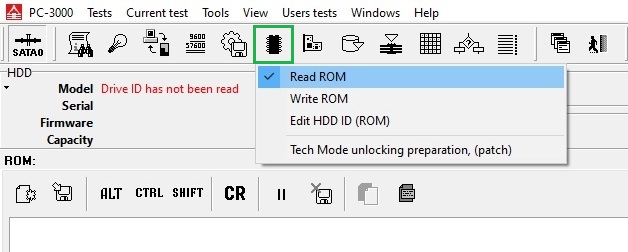
1. Read the patient ROM via Terminal
2. Let’s unlock the Donor at first:
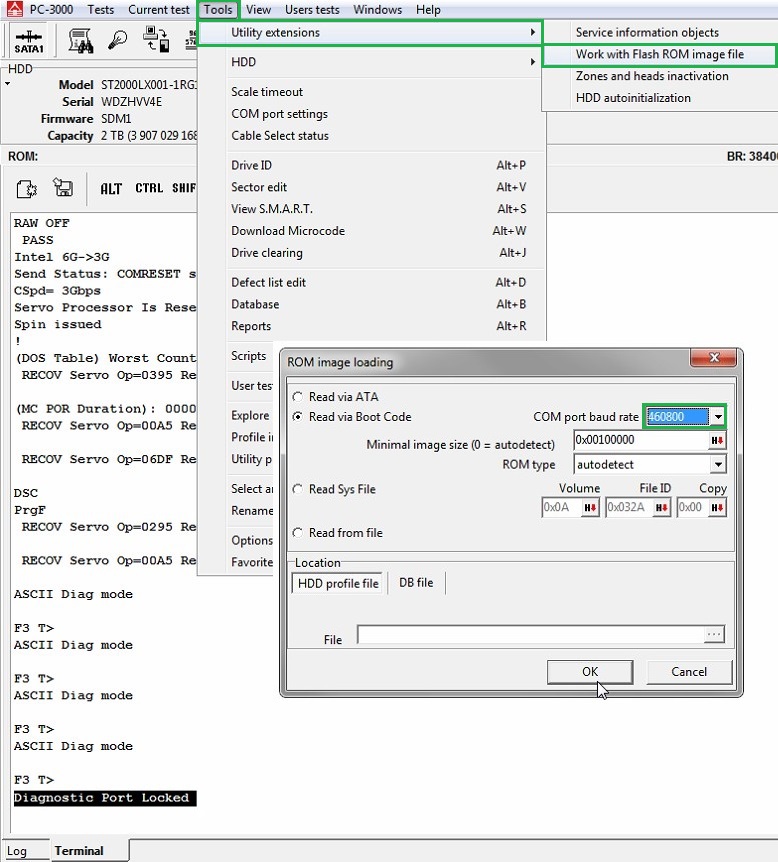
1) Work with the Flash ROM image file (Baud rate = 460800 always works)
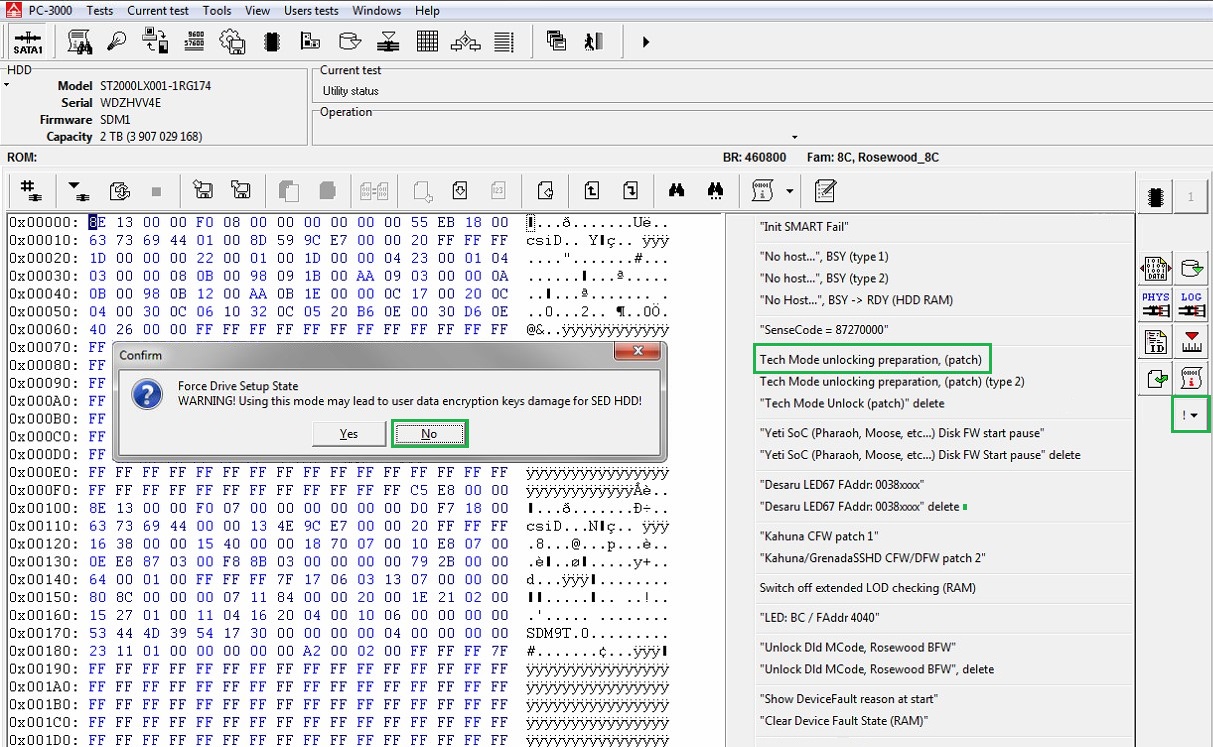
2) Perform the unlocking patch
3) Open IAP (copy 1)
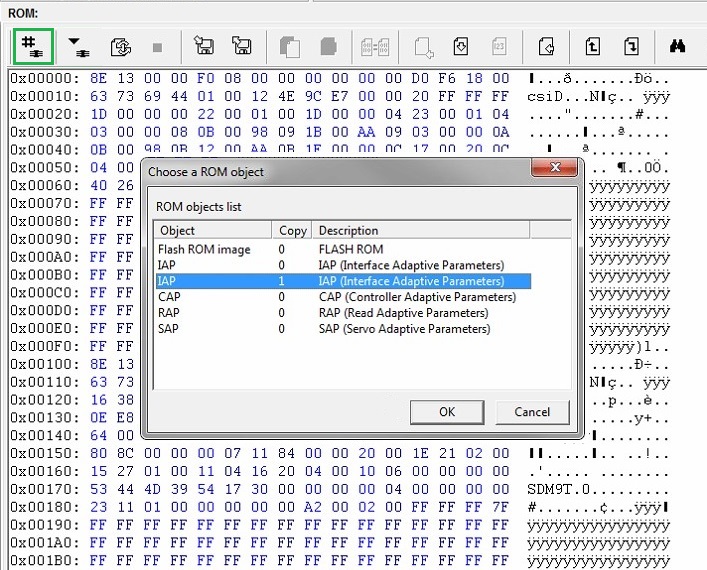
4) Find the sequence of bytes 12 34 56 78 and change the first byte to get 82 34 56 78
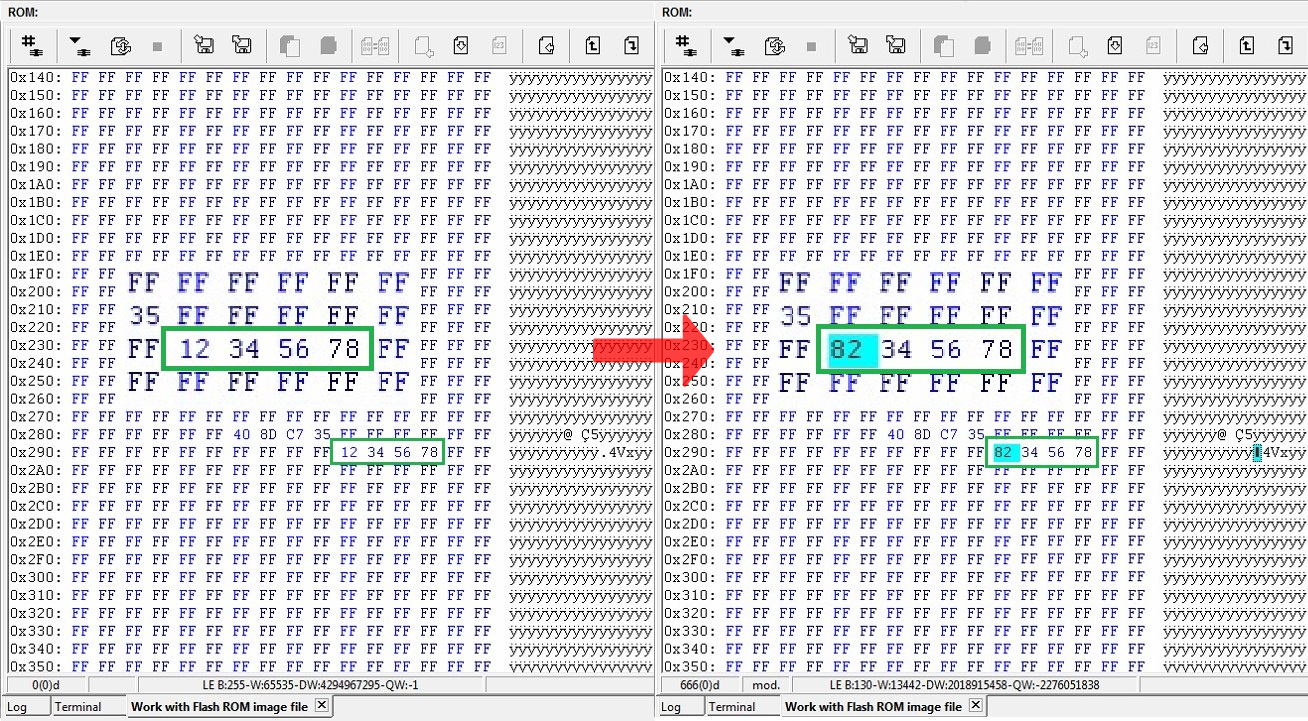
5) Apply the changes by writing ROM via Terminal 
6) Repower and unlock 
At this stage, the drive won’t come to the Ready state. The terminal log will show:
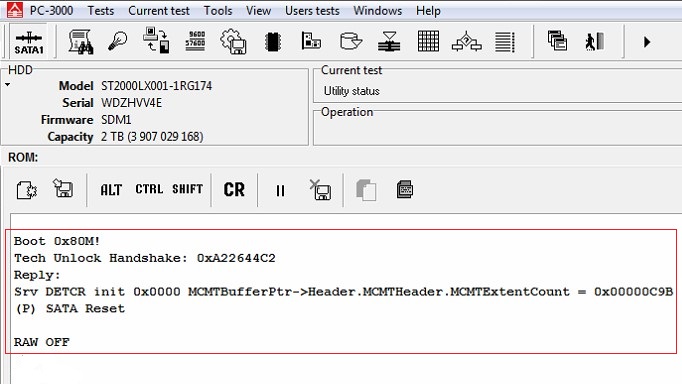
7) Open the Work with Flash ROM image tab, change the sequence of bytes to 12 34 56 78 back and write it.
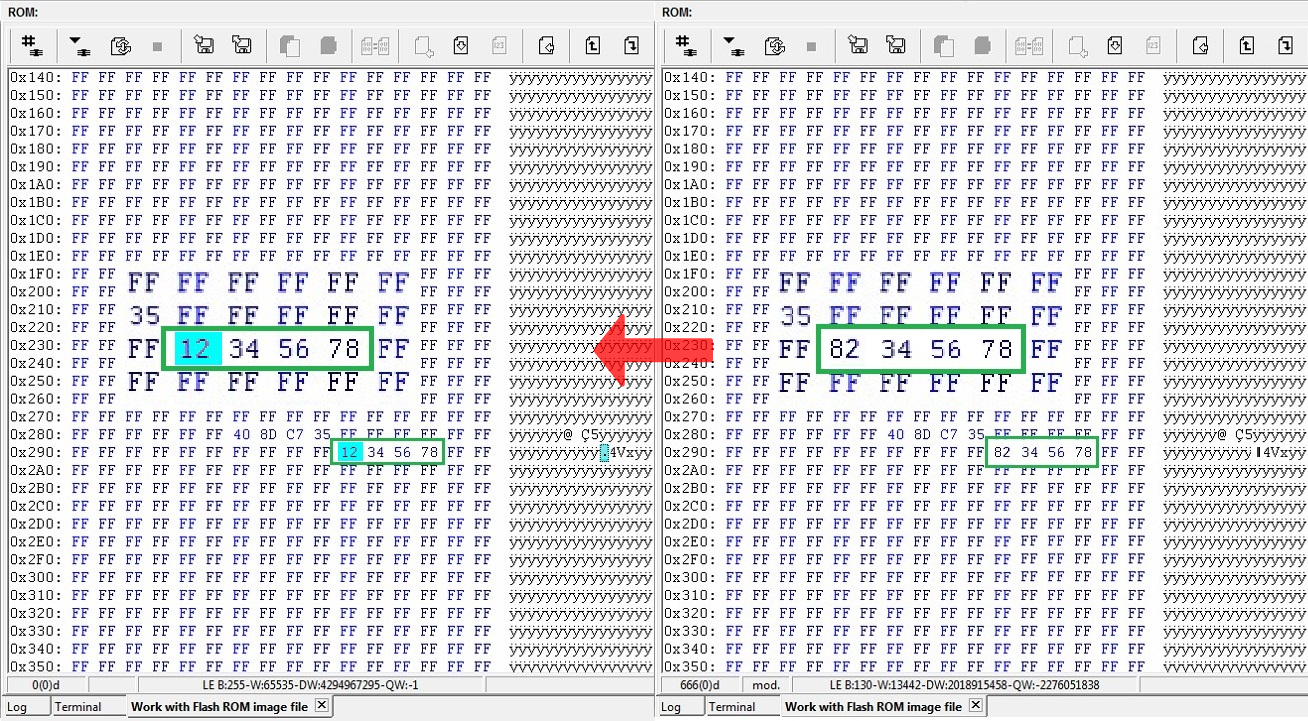
8) Again repower the drive and unlock it. Now your donor drive is unlocked and can work via ATA!
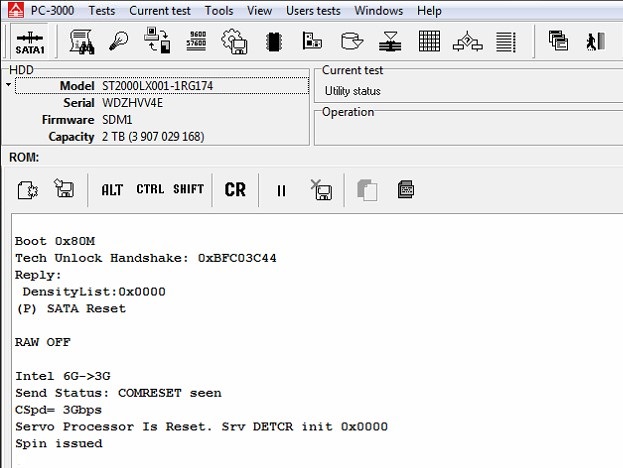
9) It’s time to do a Backup 
NOTE: It’s important to exclude 3D, 3E modules and 20D,20E sys files from saving. Also please disable the Make loader option.
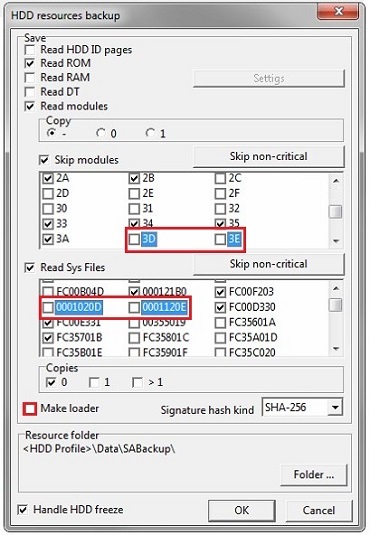
10) NAND reinitializing via the Terminal command /OI1
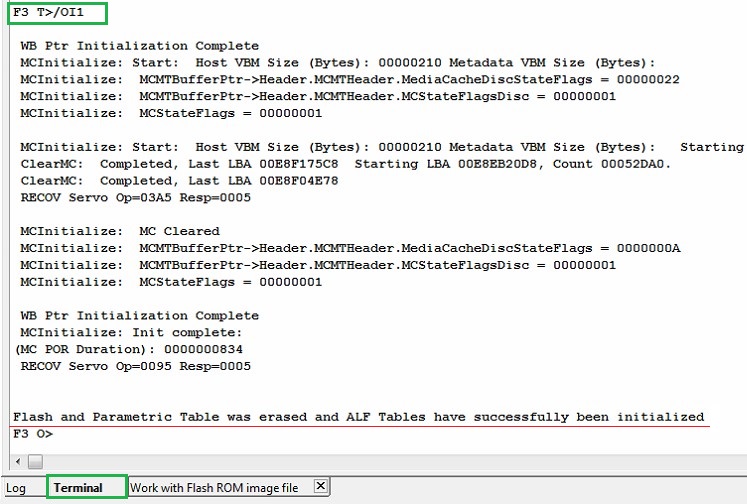
We have successfully unlocked the donor and prepared its PCB to work with the patient drive.
Show add. diag. msg in Terminal [NO] :
T>F"SerialDebugLevel",0
Offline defect sparing [NO] :
T>F"OFFLINE_SPARING_ENABLED",0
Deferred defect hiding [NO] :
T>F"DAR_ENABLED",0
Auto Reallocation (writing) [NO] :
T>F"WRITE_SPARING_ENABLED",0
Auto Reallocation (reading) [NO] :
T>F"READ_SPARING_ENABLED",0
Disable IDLE activities [YES] :
T>F"DISABLE_IDLE_ACTIVITY",1


.webp "Raminfotech Data Recovery Chennai Branch Location And Review Link")