Friday, November 3, 2023

 LED:0x000000EE FAddr:0x00329FCC

 LED:0x000000EE FAddr:0x00329FCC
 Retry delay
DOS:0 Scan Unit
    LD:
    PP:
LED:0x000000EE FAddr:0x00329FCC

Rst 0x40M Thermistor Temp 001E
LED:0x000000EE FAddr:0x00329FCC

LED:0x000000EE FAddr:0x00329FCC

LED:0x000000EE FAddr:0x00329FCC

LED:0x000000EE FAddr:0x00329FCC

LED:0x000000EE FAddr:0x00329FCC

LED:0x000000EE FAddr:0x00329FCC

LED:0x000000EE FAddr:0x00329FCC

Thursday, July 14, 2022

Case study 56-SEAGATE 5TB HDD  MCMT table is corrupted


MCMT table is corrupted
 MCMT table is corrupted
 MCMT table is corrupted
 MCMT table is corrupted
 MCMT table is corrupted
 MCMT table is corrupted
 MCMT table is corrupted
 MCMT table is corrupted
 MCMT table is corrupted
 MCMT table is corrupted
 MCMT table is corrupted
 MCMT table is corrupted
 MCMT table is corrupted
 MCMT table is corrupted
 MCMT table is corrupted
 MCMT table is corrupted
 MCMT table is corrupted
 MCMT table is corrupted
 MCMT table is corrupted
 MCMT table is corrupted
 MCMT table is corrupted
 MCMT table is corrupted
 MCMT table is corrupted
 MCMT table is corrupted
 MCMT table is corrupted
 MCMT table is corrupted
 MCMT table is corrupted
 MCMT table is corrupted
 MCMT table is corrupted
 MCMT table is corrupted
 MCMT table is corrupted
 MCMT table is corrupted
 MCMT table is corrupted
 MCMT table is corrupted
 MCMT table is corrupted
 MCMT table is corrupted
 MCMT table is corrupted
No HOST FIS-ReadyStatusFlags 0002A1A1
ServoDiscSlip Time = 00000037

Sunday, June 12, 2022

AA

 SEA4 Boot ROM 1.0 (10/15/2011)
Copyright Seagate  2011

Flash boot code checksum failure!

SEA4 Boot ROM 1.0 (10/15/2011)
Copyright Seagate  2011

Flash boot code checksum failure!

SEA4 Boot ROM 1.0 (10/15/2011)
Copyright Seagate  2011

Flash boot code checksum failure!

SEA4 Boot ROM 1.0 (10/15/2011)
Copyright Seagate  2011

Flash boot code checksum failure!

SEA4 Boot ROM 1.0 (10/15/2011)
Copyright Seagate  2011

Flash boot code checksum failure!

SEA4 Boot ROM 1.0 (10/15/2011)
Copyright Seagate  2011

Flash boot code checksum failure!

SEA4 Boot ROM 1.0 (10/15/2011)
Copyright Seagate  2011

Flash boot code checksum failure!

SEA4 Boot ROM 1.0 (10/15/2011)
Copyright Seagate  2011


Wednesday, April 27, 2022

Case study 53  Read ROM................................ : HDDs ROM reading error Device Error Detected: "CA FLUSH ALL GOT CANCELED"


Read ROM................................ : HDDs ROM reading error Device Error Detected: "CA FLUSH ALL GOT CANCELED"


 Seems in his case it was a PCB failure. Perhaps you've got two bad PCBs? Or maybe a corrupted ROM.


    Model : WDC WD40NMZW-11GX6S1
  Serial : WD-WX11D9651HY9
Firmware : 01.01A01
Capacity : 4 TB (7 814 037 168)


Incremental reading..................... : No translator entry found
Module : 190 (Copy 0)................... : Critical header error
Incremental reading..................... : No translator entry found
Module : 190 (Copy 1)................... : Critical header error


Tuesday, April 26, 2022

How to Fix a Rosewood SSHD with a Damaged NAND Chip


The issue with a damaged NAND chip is very popular for the ST1000LX015 and ST2000LX001 models. At the ACE Lab Online Technical Conference 2021 we showed a case on this topic. Following up, this blog article with step-by-step instructions explains the provided solution.


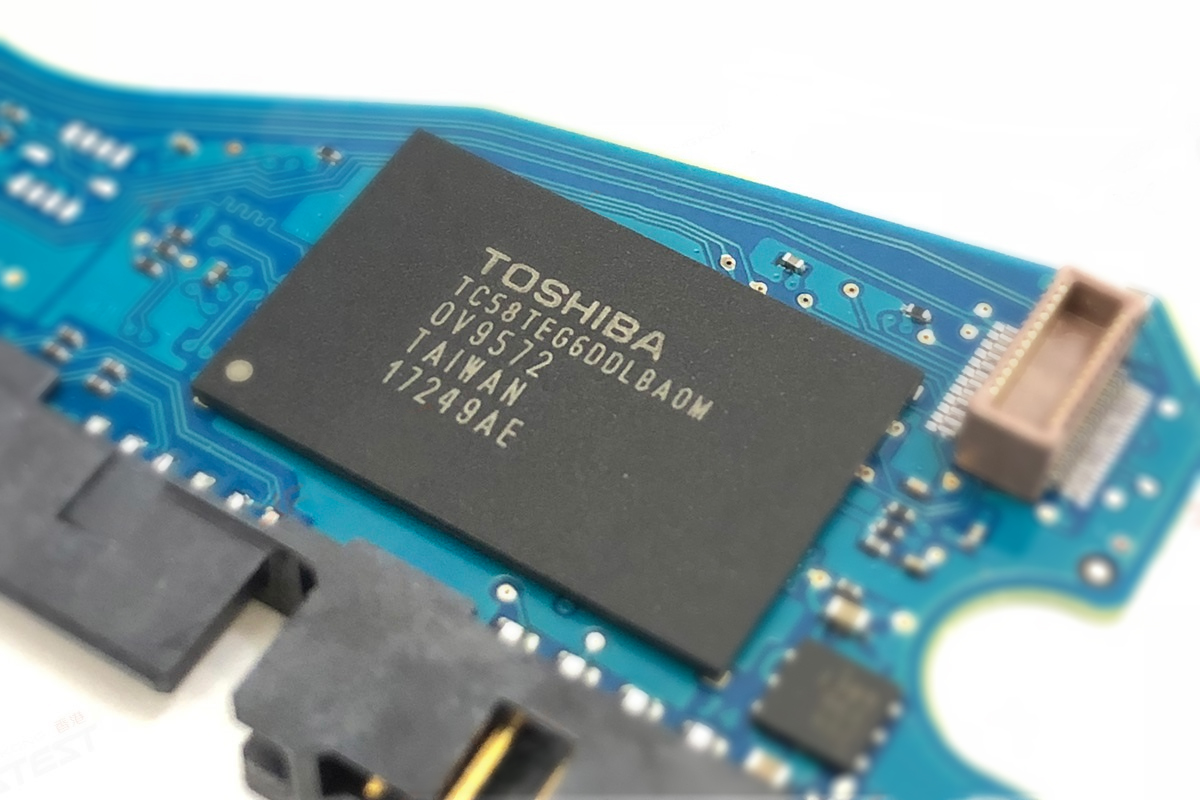
The difference between Classic HDD and Hybrid SSHD is a NAND memory chip located on the PCB. This chip was added to improve the HDD initialization speed, and it stores a part of HDD FW. Also, it’s used as a cache for the user data.
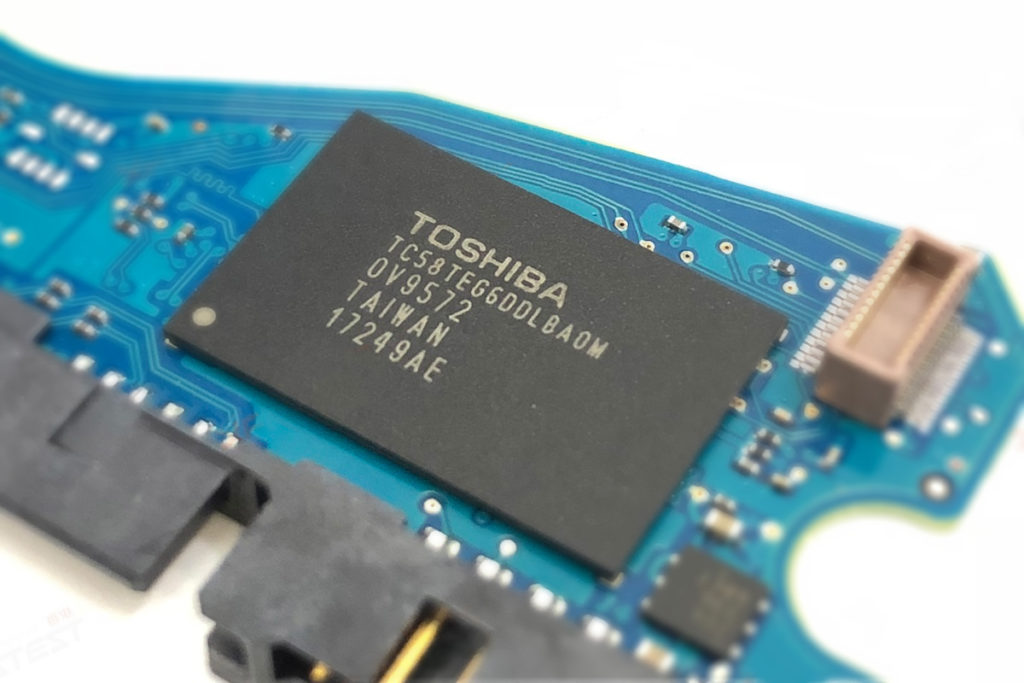
At the same time, the NAND chip becomes a weak point of the drive due to the Flash memory specifics. It means if this chip is damaged, the drive won’t be able to initialize itself even if the SA part on the platters is OK.

How to recognize the problem?

The behaviour is similar: the drive isn’t spinning after power on but it comes to the DRD + DSC state and shows the correct passport information. Usually, after power on, you can see such an error message in the Terminal tab:

LED:0x000000BD FAddr:0x000059D8

So what to do?

First of all, it’s necessary to understand that in this case the patient’s PCB is damaged. We can’t unlock the drive using the native board!

Which parameters should I follow to choose a suitable donor?

  1.  Same HDD model
  2.  Same FW version
  3.  Same PCB number

All three parameters should be followed.

What is the solution?

1. Read the patient ROM via Terminal
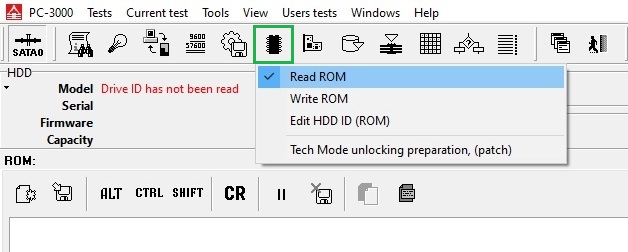
2. Let’s unlock the Donor at first:

1) Work with the Flash ROM image file (Baud rate = 460800 always works)
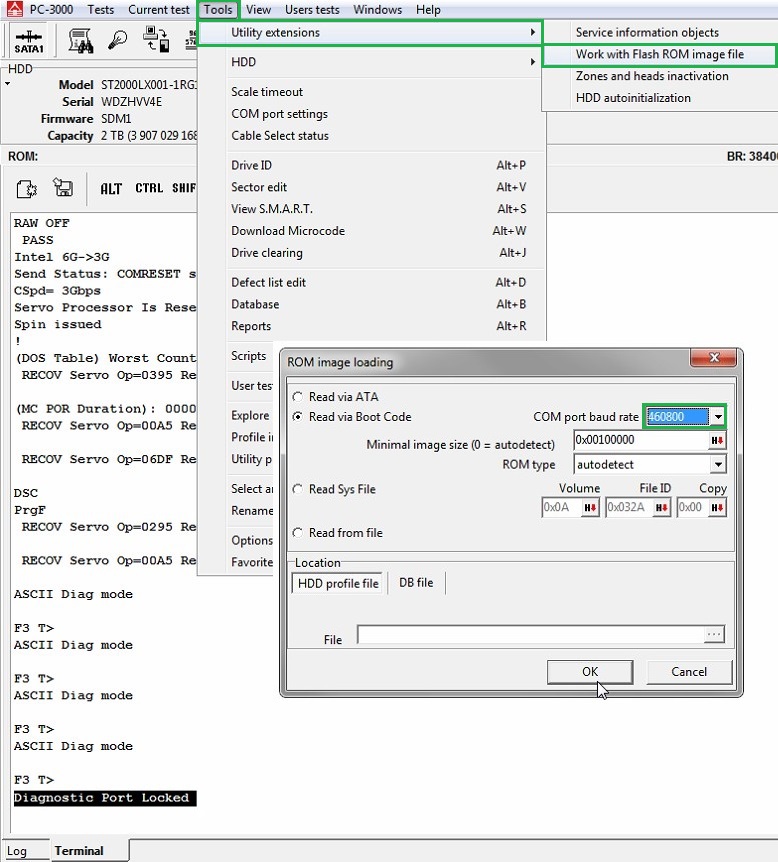

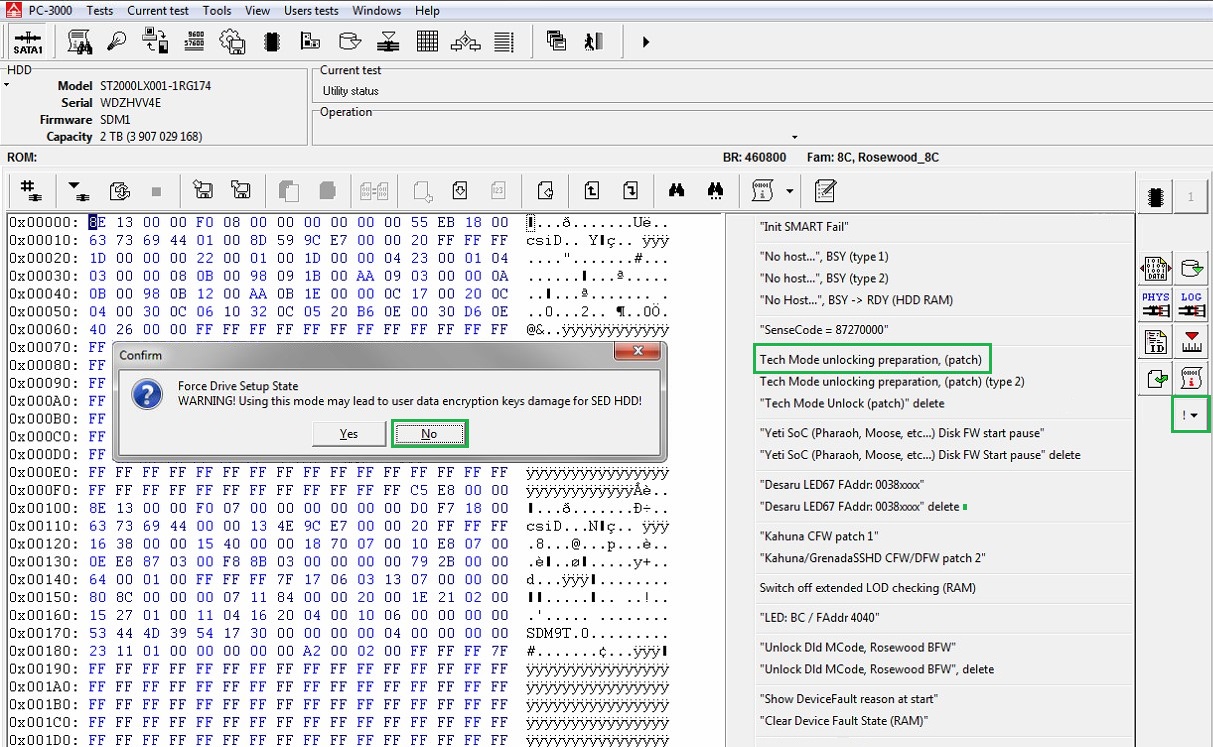
2) Perform the unlocking patch
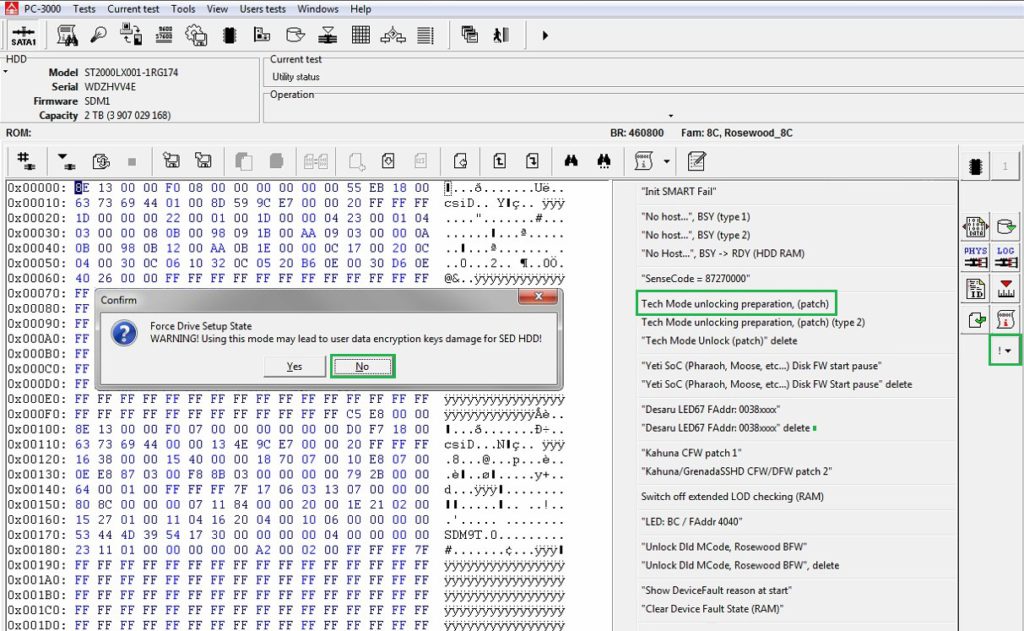

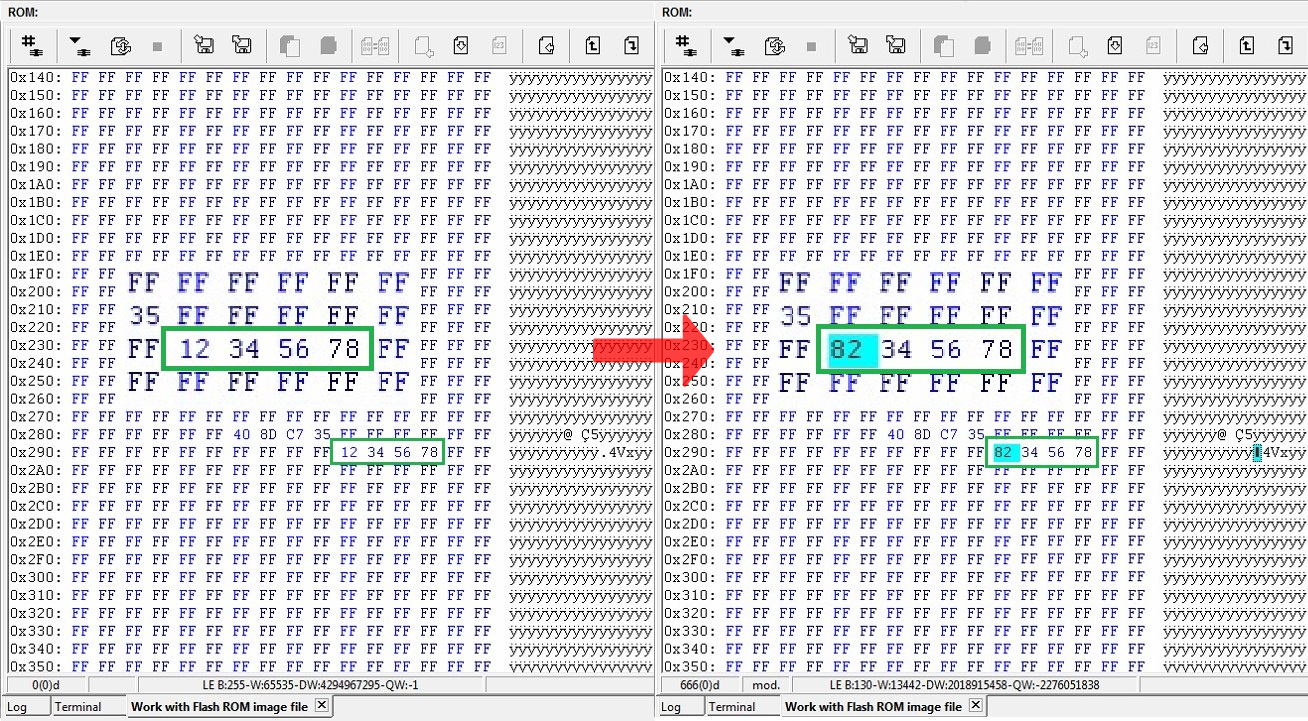
3) Open IAP (copy 1)
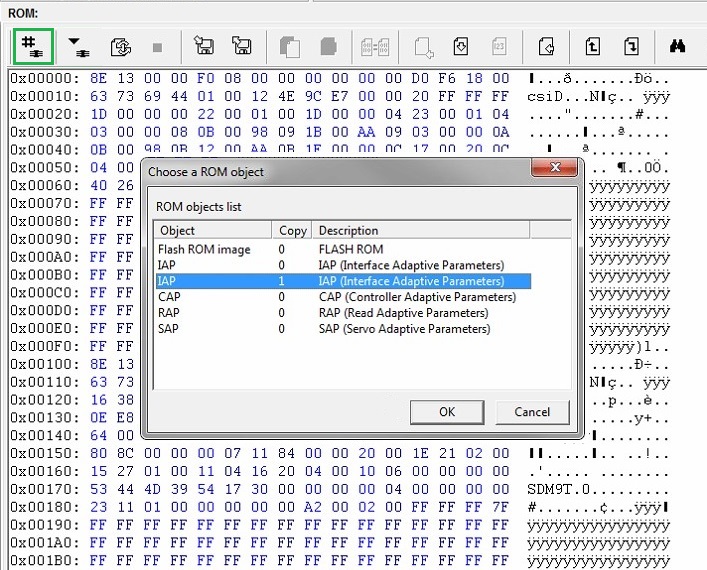
4) Find the sequence of bytes 12 34 56 78 and change the first byte to get 82 34 56 78
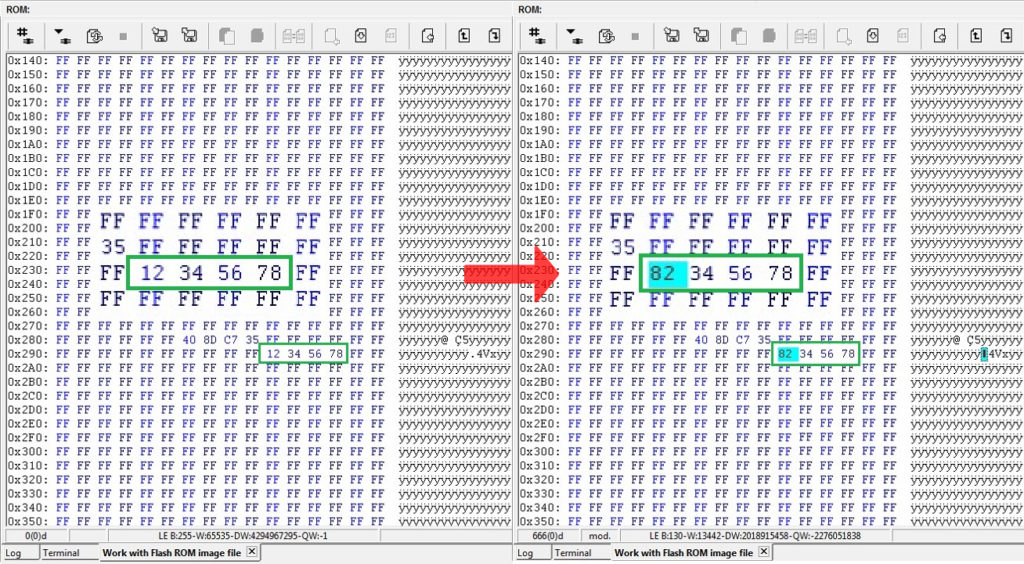

5) Apply the changes by writing ROM via Terminal    

6) Repower and unlock  

At this stage, the drive won’t come to the Ready state. The terminal log will show:
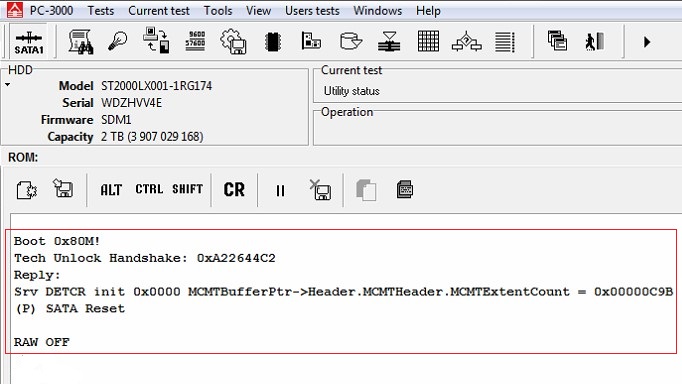

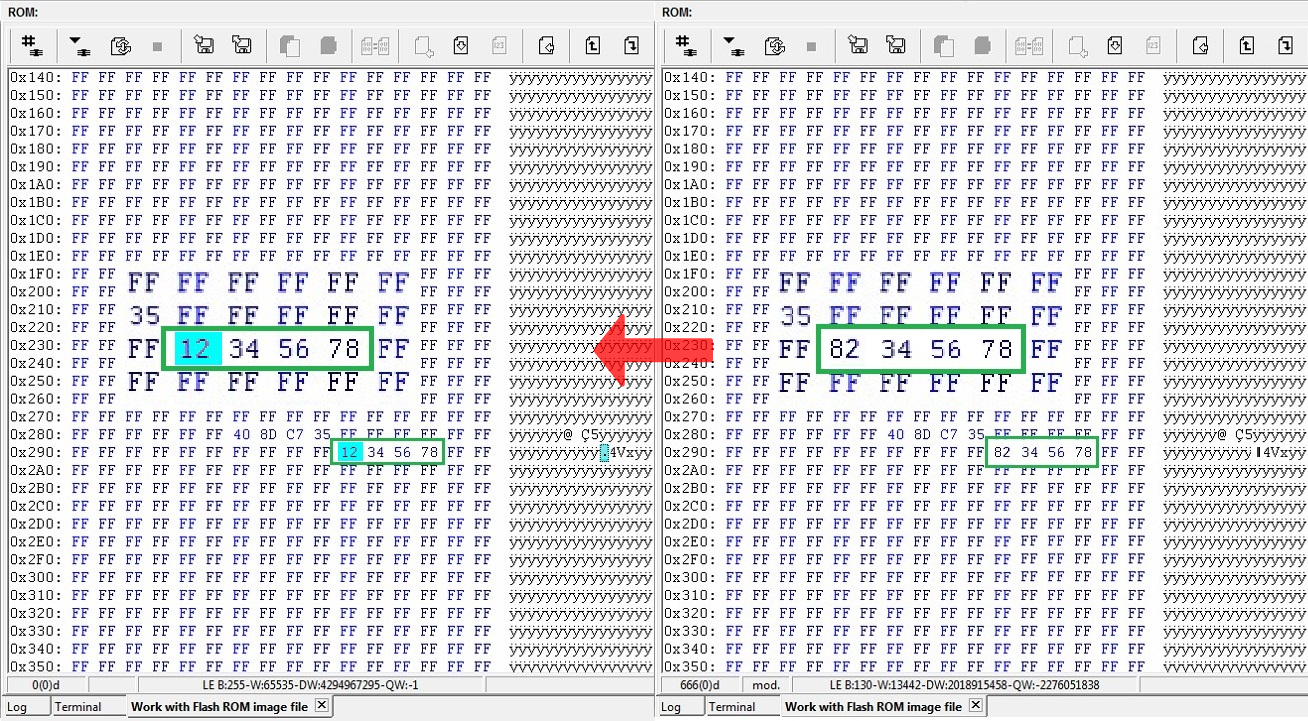
7) Open the Work with Flash ROM image tab, change the sequence of bytes to 12 34 56 78 back and write it.
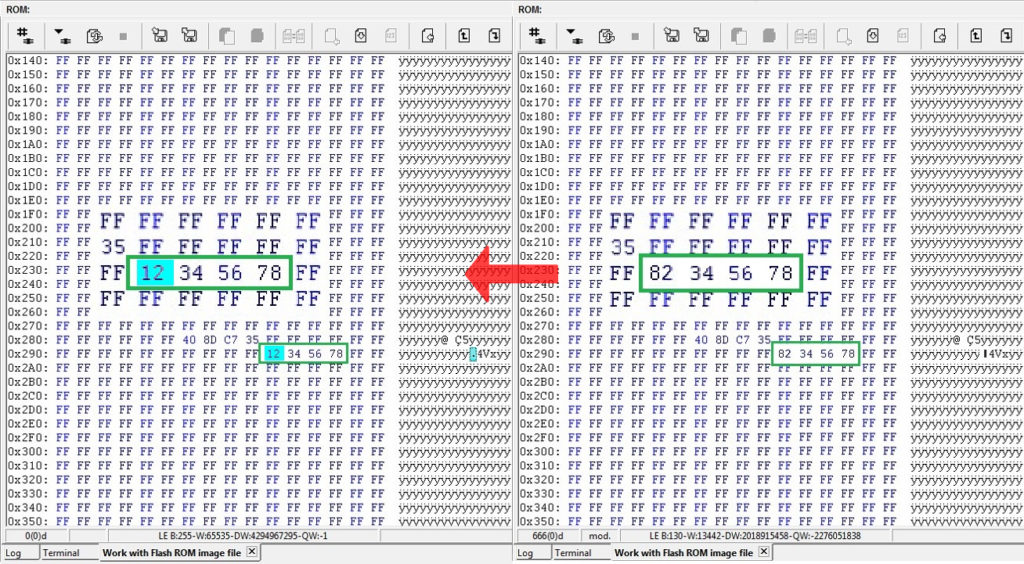
8) Again repower the drive and unlock it. Now your donor drive is unlocked and can work via ATA!
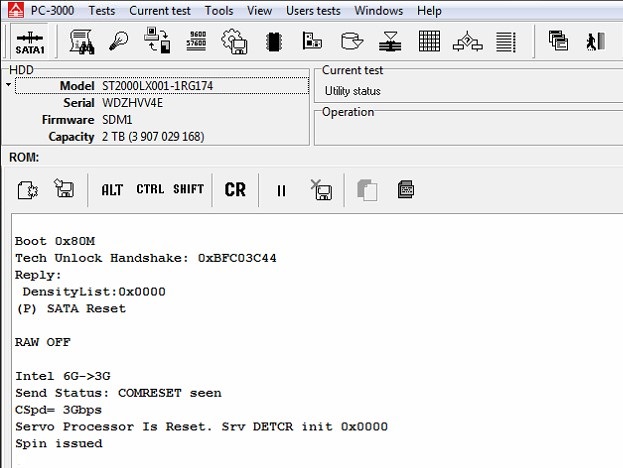
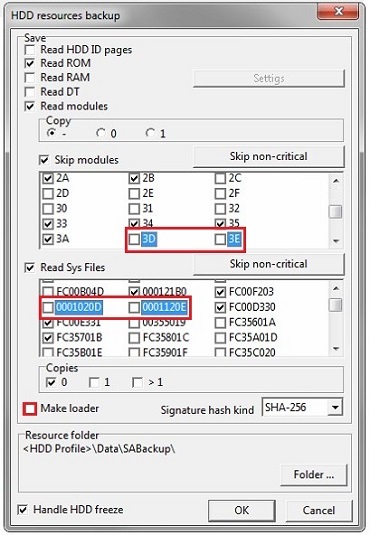
9) It’s time to do a Backup  

NOTE: It’s important to exclude 3D, 3E modules and 20D,20E sys files from saving. Also please disable the Make loader option. 
10) NAND reinitializing via the Terminal command /OI1
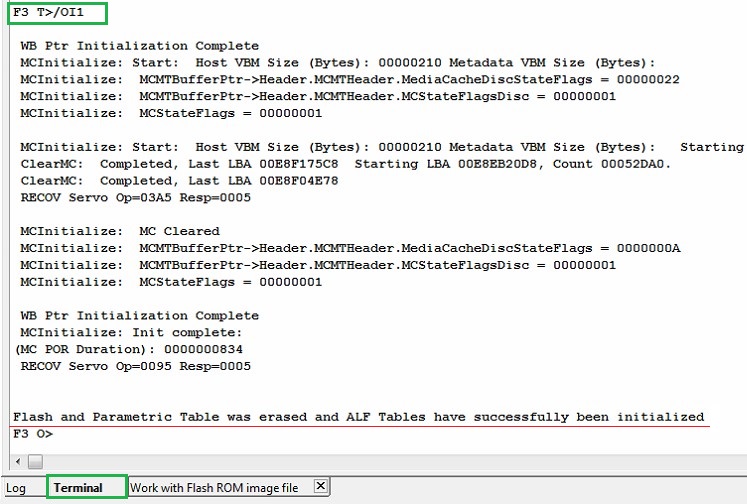
We have successfully unlocked the donor and prepared its PCB to work with the patient drive.

3. Unlocking the patient will be very similar:

1) Write previously saved patient ROM on the donor board via Terminal;

2) Set the donor board on the patient HDA;

3) Repeat the unlocking steps (1-6);

4) Additional NAND reinitializing via Terminal (/OI1 command);

5) Repeat the unlocking steps (7-9).

How to disable reallocations and other background processes?

It can be done only via Terminal sending these commands:

Show add. diag. msg in Terminal [NO] :
T>F”SerialDebugLevel”,0

Offline defect sparing [NO] :
T>F”OFFLINE_SPARING_ENABLED”,0

Deferred defect hiding [NO] :
T>F”DAR_ENABLED”,0

Auto Reallocation (writing) [NO] :
T>F”WRITE_SPARING_ENABLED”,0

Auto Reallocation (reading) [NO] :
T>F”READ_SPARING_ENABLED”,0

Disable IDLE activities [YES] :
T>F”DISABLE_IDLE_ACTIVITY”,1

NOTE: Don’t try to disable SMP flags in 93 sys file via the standard way in the ATA mode. It can brick the drive!

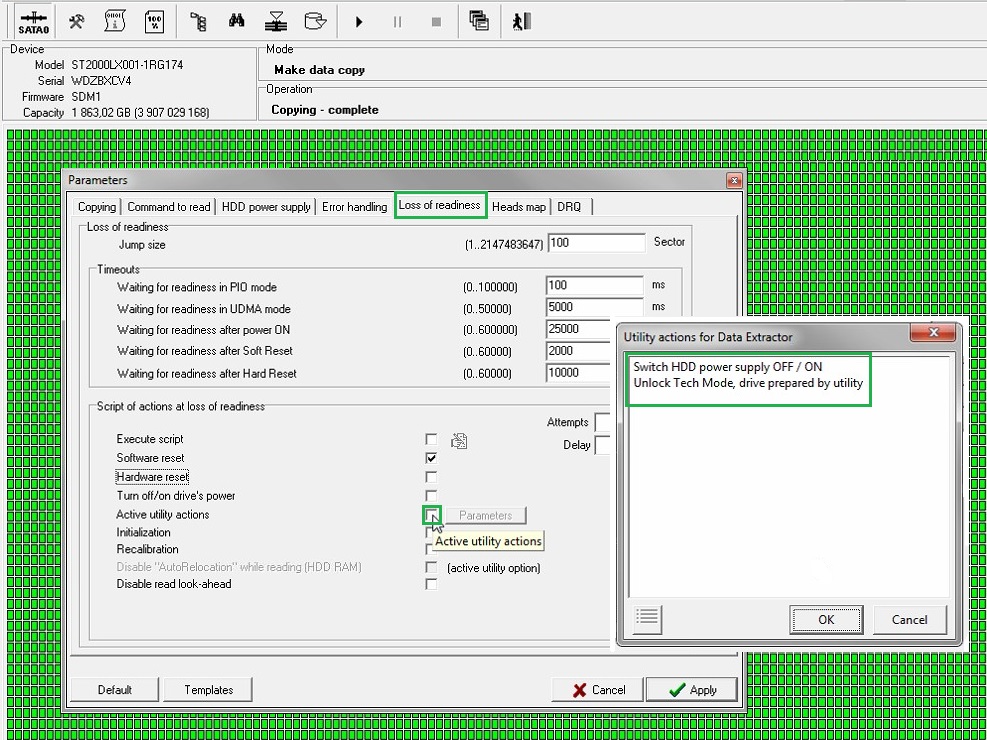
That’s it, now your drive is ready for imaging! Remember to add Autounlock in DE settings.
Thursday, March 10, 2022

Case study 52


Model : HGST HTS541010A7E630
  Serial : S04001SSH8ML9F
Firmware : SE0OA4A0
Capacity : 0 MB ()
Loading the table of "open" modules................................... : Error
Error : .............................................................. : Error executing loading "open" modules dir command
 
Error executing command: Reading SA [0x3F0000004, 0x4]
Device error detected "ABR"
Error reading module USAG(0): Error executing command: Reading SA [0x3F0000004, 0x1]
Device error detected "ABR"
Error executing command: Reading SA [0x3F0100004, 0x4]
Device error detected "ABR"
Error reading module USAG(1): Error executing command: Reading SA [0x3F0100004, 0x1]
Device error detected "ABR"
Loading modules table................................................. : Error
Error : .............................................................. : Module USAG: no copies read!
Loading the table of "open" modules................................... : Error
Error : .............................................................. : Error executing loading "open" modules dir command
Drive identification reading ........... : Ok
 
Drive identification reading ........... : Ok
 
Drive identification reading ........... : Ok