SMR Zone read error: No SATA connection
Allow UA writing
And exit for utilities
And power off and on and again open utilities
Then head map and again lock UA writing
Done then lock UA WRITING





RW Error C4440080
SIM Error 1002
RW Error C4440080
(P) SATA Reset
SIM Error 1002
RW Error C4440080
SIM Error 1002
RW Error C4440080 PASS
SIM Error 1002
RW Error C4440080
SIM Error 1002
RW Error C4440080
SIM Error 1002
RW Error C4440080WriteDCOInfo FAILED during Initialization
SIM Error 1002
RW Error C4440080
SIM Error 1002
RW Error C4440080
MediaPartition:


MCMT table is corrupted
MCMT table is corrupted
MCMT table is corrupted
MCMT table is corrupted
MCMT table is corrupted
MCMT table is corrupted
MCMT table is corrupted
MCMT table is corrupted
MCMT table is corrupted
MCMT table is corrupted
MCMT table is corrupted
MCMT table is corrupted
MCMT table is corrupted
MCMT table is corrupted
MCMT table is corrupted
MCMT table is corrupted
MCMT table is corrupted
MCMT table is corrupted
MCMT table is corrupted
MCMT table is corrupted
MCMT table is corrupted
MCMT table is corrupted
MCMT table is corrupted
MCMT table is corrupted
MCMT table is corrupted
MCMT table is corrupted
MCMT table is corrupted
MCMT table is corrupted
MCMT table is corrupted
MCMT table is corrupted
MCMT table is corrupted
MCMT table is corrupted
MCMT table is corrupted
MCMT table is corrupted
MCMT table is corrupted
MCMT table is corrupted
MCMT table is corrupted
No HOST FIS-ReadyStatusFlags 0002A1A1
ServoDiscSlip Time = 00000037


SIM Error 1009
RW Error 00000080
Model : ST1000LM010-9YH146
Serial : Z100V8DY
Firmware : CC9F
Capacity : 1 000 GB (1 953 525 168)
Drive shows correct ID, capacity, ready state, but doesn’t allow to read sectors.
We would like you to pay attention to messages in terminal:
SIM Error 1009
RW Error 00000080
It means that drive has problem with S.M.A.R.T partially with system file 0x017A
Let check it terminal
This terminal output means that system file 17A is damaged.
Try to read it
We get error when try to read system file
Write 17A sys file (you can take it from the link provided at the bottom of the article)
File is written and now check the terminal output after power off/on
Drive comes to ready state and doesn’t send error messages in terminal.
And link for a good 17A system file


Model : WDC WD10TMVW-11ZSMS5
Serial : WD-WXQ1A7117394
Firmware : 01.01A01
Capacity : 1 000 GB (1 953 525 168)
PROBLEM : NOT WORKING HDD
NOW USB TO SATA CONVERTED FIRMWARE PROBLEM SOLVED AFTER HDD WORKING
ALL DATA RECOVERY BY RAMINFOTECH DATA RECOVERY

470 GB DATA RECOVERY
RamInfotech Data Recovery
No 24/13, Ground Floor, Pillayar Koil St,
Near R8Police Station, , Vadapalani,
Chennai, Tamil Nadu 600026
070921 14422
www.datarecoverychennai.co.in
www.raminfotechdatarecovery.com

SEA4 Boot ROM 1.0 (10/15/2011)
Copyright Seagate 2011
Flash boot code checksum failure!
SEA4 Boot ROM 1.0 (10/15/2011)
Copyright Seagate 2011
Flash boot code checksum failure!
SEA4 Boot ROM 1.0 (10/15/2011)
Copyright Seagate 2011
Flash boot code checksum failure!
SEA4 Boot ROM 1.0 (10/15/2011)
Copyright Seagate 2011
Flash boot code checksum failure!
SEA4 Boot ROM 1.0 (10/15/2011)
Copyright Seagate 2011
Flash boot code checksum failure!
SEA4 Boot ROM 1.0 (10/15/2011)
Copyright Seagate 2011
Flash boot code checksum failure!
SEA4 Boot ROM 1.0 (10/15/2011)
Copyright Seagate 2011
Flash boot code checksum failure!
SEA4 Boot ROM 1.0 (10/15/2011)
Copyright Seagate 2011


Read ROM................................ : HDDs ROM reading error Device Error Detected: "CA FLUSH ALL GOT CANCELED"
Seems in his case it was a PCB failure. Perhaps you've got two bad PCBs? Or maybe a corrupted ROM.
Model : WDC WD40NMZW-11GX6S1
Serial : WD-WX11D9651HY9
Firmware : 01.01A01
Capacity : 4 TB (7 814 037 168)
Incremental reading..................... : No translator entry found
Module : 190 (Copy 0)................... : Critical header error
Incremental reading..................... : No translator entry found
Module : 190 (Copy 1)................... : Critical header error

The issue with a damaged NAND chip is very popular for the ST1000LX015 and ST2000LX001 models. At the ACE Lab Online Technical Conference 2021 we showed a case on this topic. Following up, this blog article with step-by-step instructions explains the provided solution.
The difference between Classic HDD and Hybrid SSHD is a NAND memory chip located on the PCB. This chip was added to improve the HDD initialization speed, and it stores a part of HDD FW. Also, it’s used as a cache for the user data.
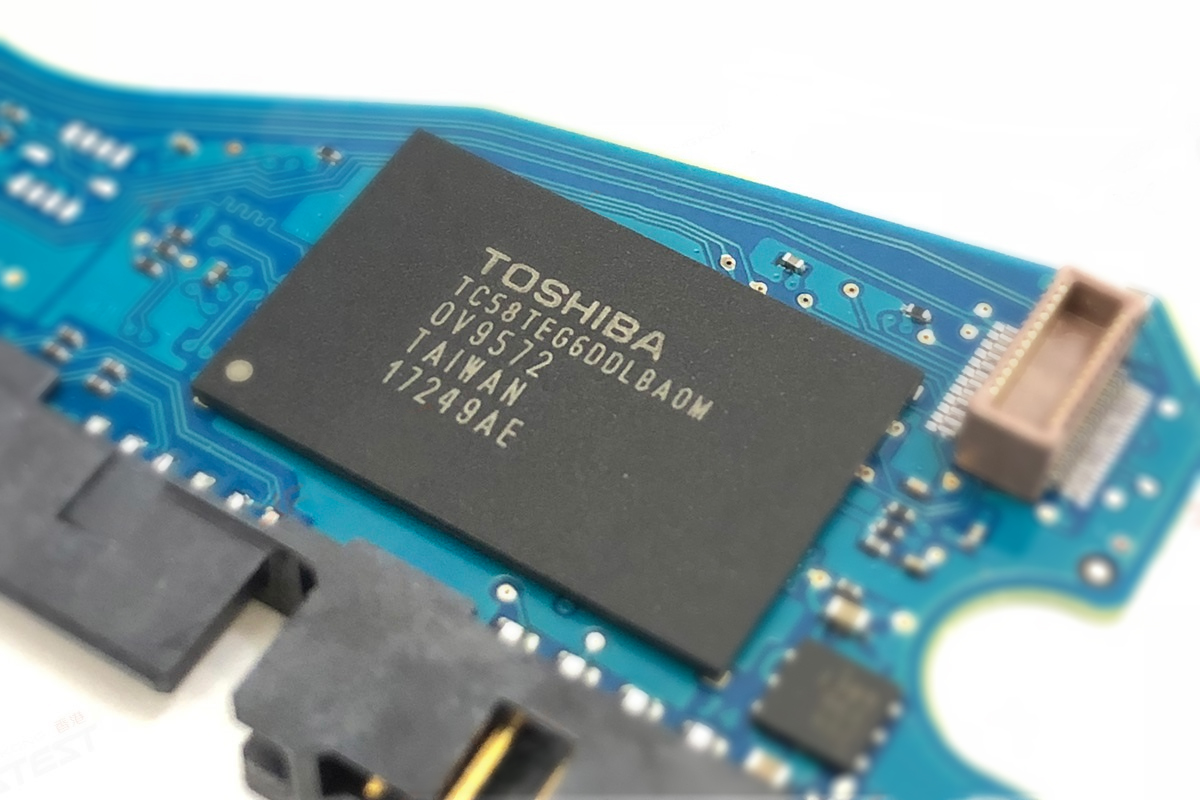
At the same time, the NAND chip becomes a weak point of the drive due to the Flash memory specifics. It means if this chip is damaged, the drive won’t be able to initialize itself even if the SA part on the platters is OK.
How to recognize the problem?
The behaviour is similar: the drive isn’t spinning after power on but it comes to the DRD + DSC state and shows the correct passport information. Usually, after power on, you can see such an error message in the Terminal tab:
LED:0x000000BD FAddr:0x000059D8
So what to do?
First of all, it’s necessary to understand that in this case the patient’s PCB is damaged. We can’t unlock the drive using the native board!
Which parameters should I follow to choose a suitable donor?
All three parameters should be followed.
What is the solution?
1. Read the patient ROM via Terminal
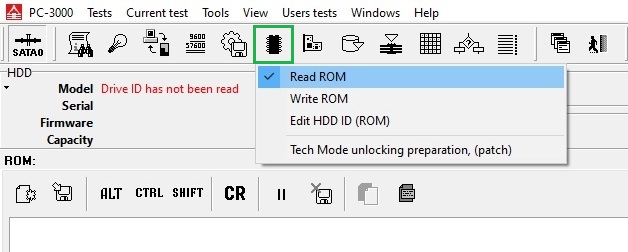
2. Let’s unlock the Donor at first:
1) Work with the Flash ROM image file (Baud rate = 460800 always works)
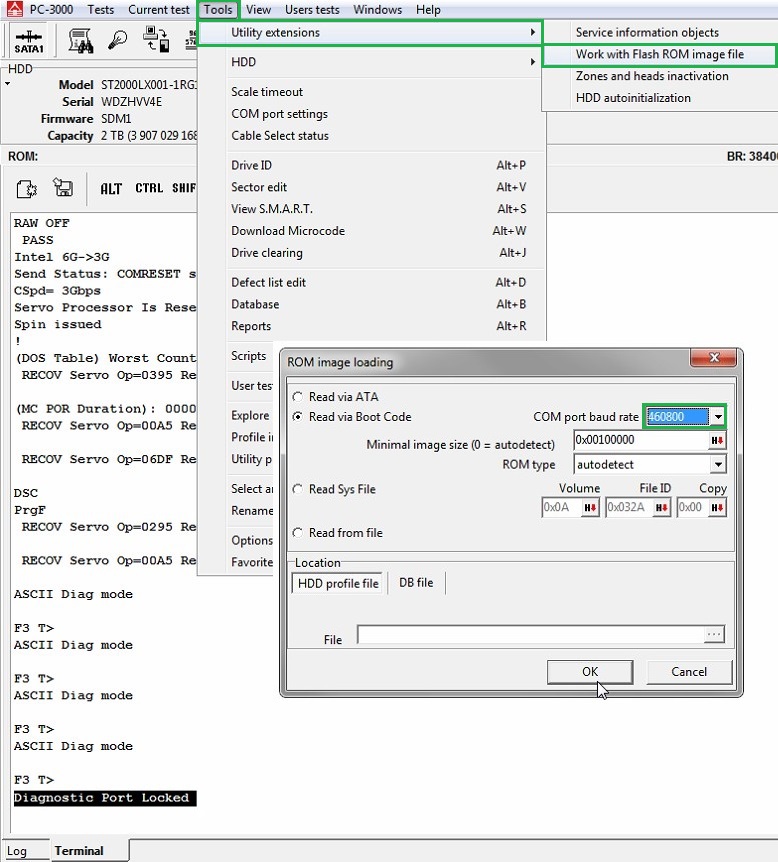
2) Perform the unlocking patch
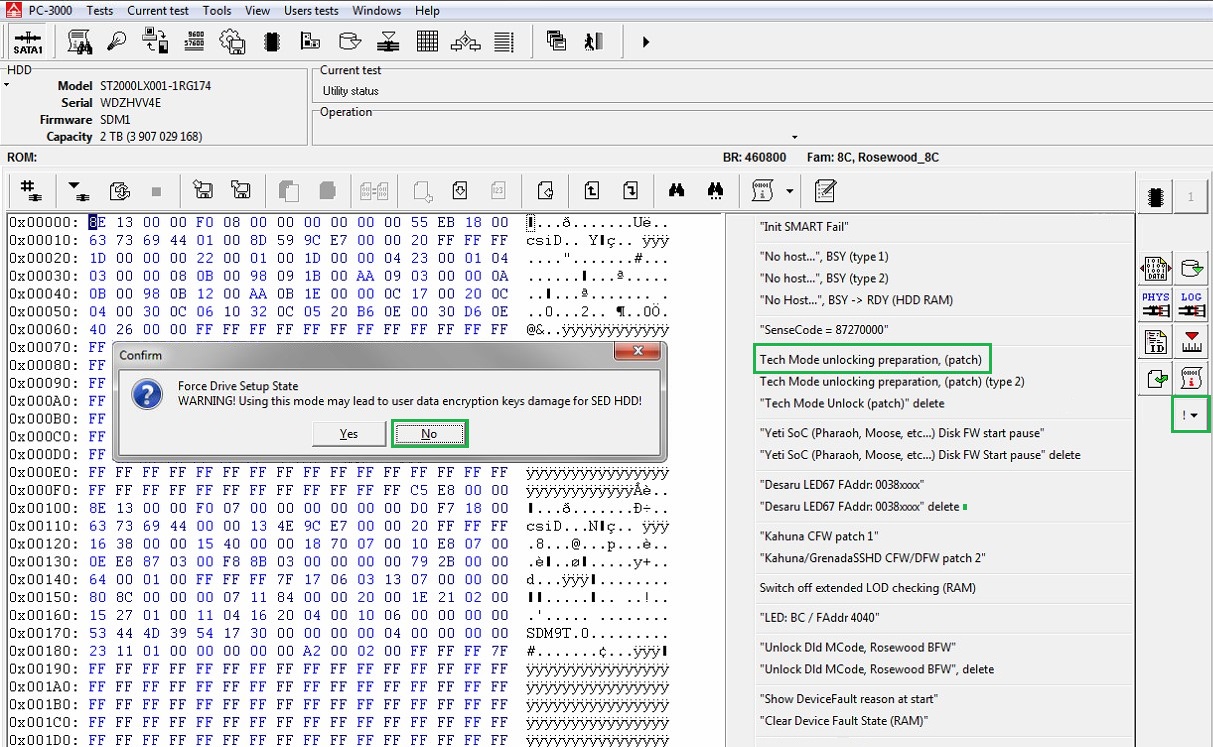
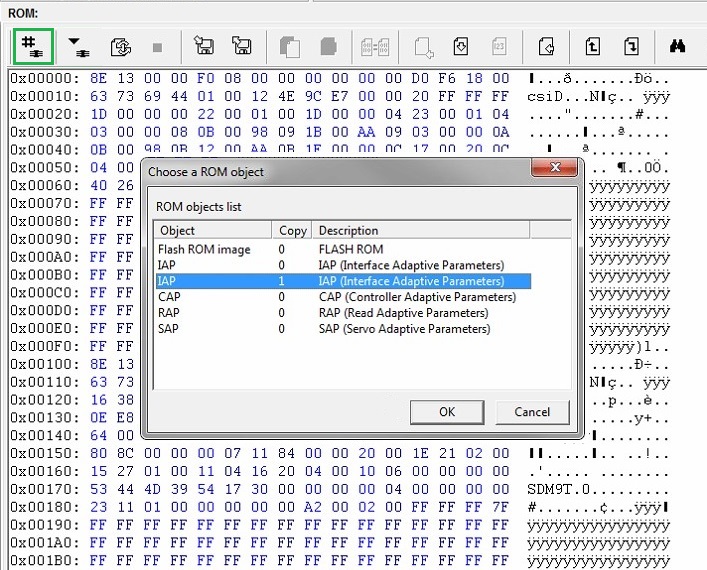
3) Open IAP (copy 1)
4) Find the sequence of bytes 12 34 56 78 and change the first byte to get 82 34 56 78
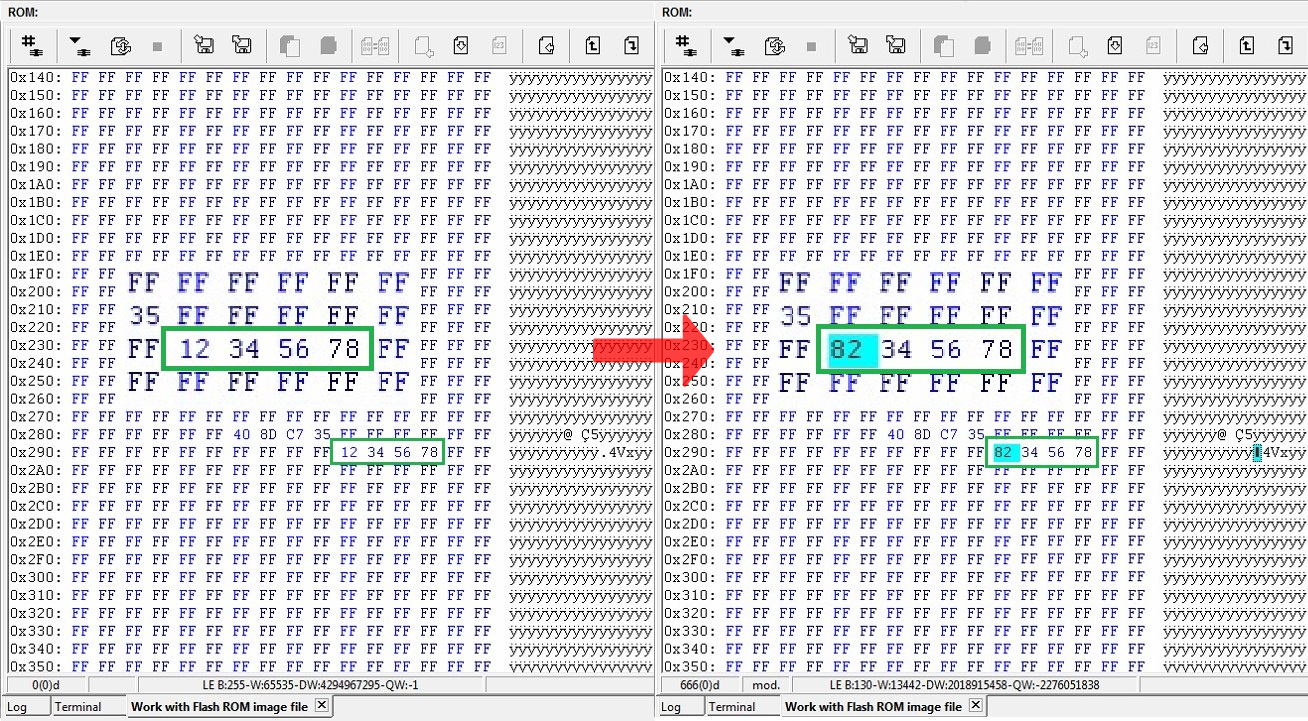
5) Apply the changes by writing ROM via Terminal 
6) Repower and unlock 
At this stage, the drive won’t come to the Ready state. The terminal log will show:
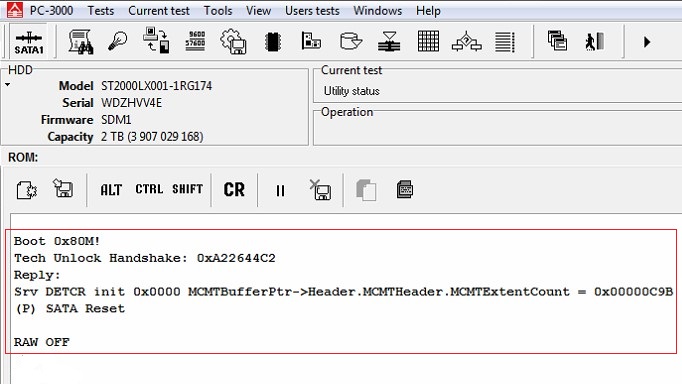
7) Open the Work with Flash ROM image tab, change the sequence of bytes to 12 34 56 78 back and write it.
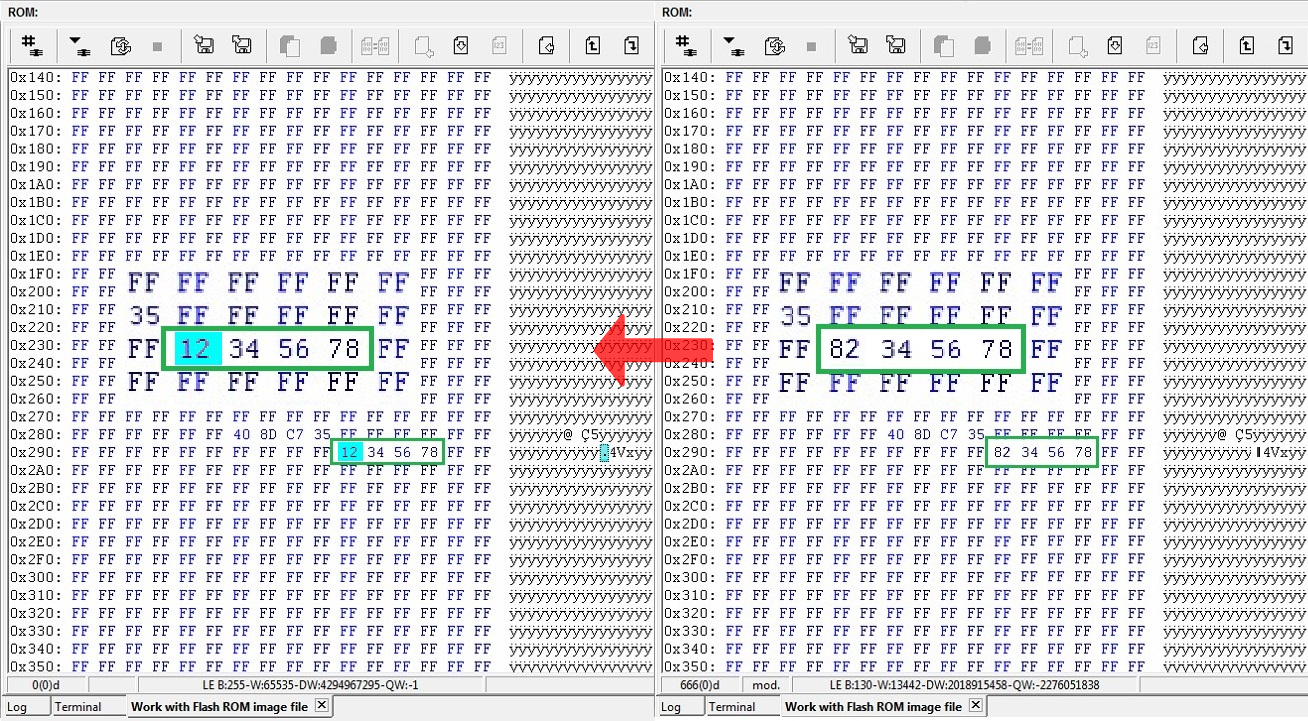
8) Again repower the drive and unlock it. Now your donor drive is unlocked and can work via ATA!
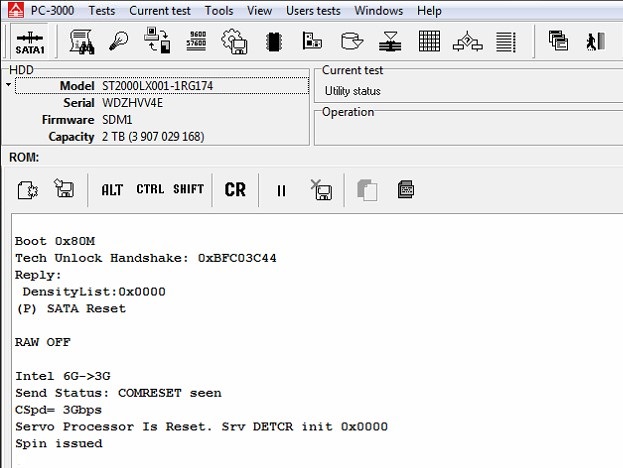
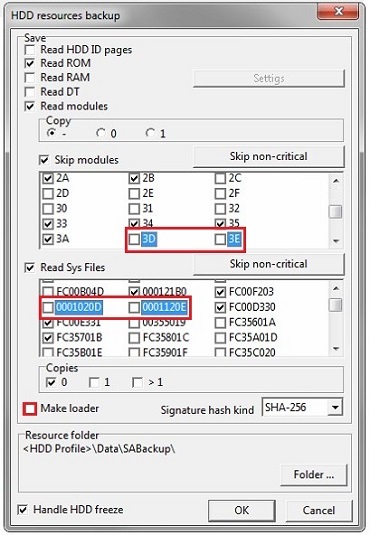
9) It’s time to do a Backup 
NOTE: It’s important to exclude 3D, 3E modules and 20D,20E sys files from saving. Also please disable the Make loader option.
10) NAND reinitializing via the Terminal command /OI1
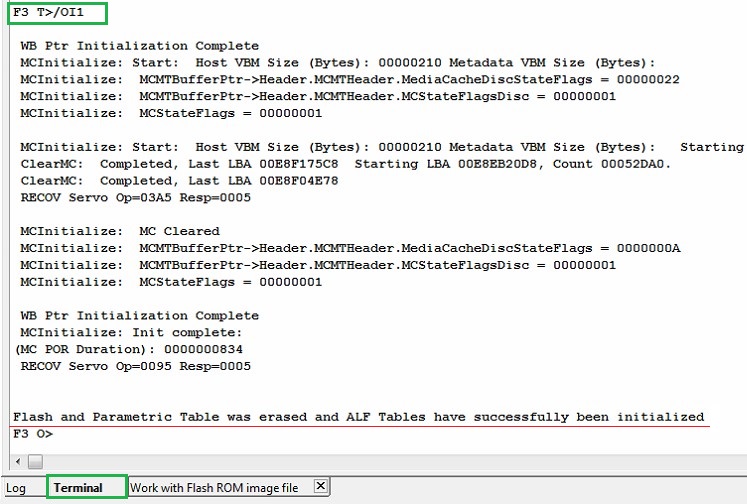
We have successfully unlocked the donor and prepared its PCB to work with the patient drive.
3. Unlocking the patient will be very similar:
1) Write previously saved patient ROM on the donor board via Terminal;
2) Set the donor board on the patient HDA;
3) Repeat the unlocking steps (1-6);
4) Additional NAND reinitializing via Terminal (/OI1 command);
5) Repeat the unlocking steps (7-9).
How to disable reallocations and other background processes?
It can be done only via Terminal sending these commands:
Show add. diag. msg in Terminal [NO] :
T>F”SerialDebugLevel”,0
Offline defect sparing [NO] :
T>F”OFFLINE_SPARING_ENABLED”,0
Deferred defect hiding [NO] :
T>F”DAR_ENABLED”,0
Auto Reallocation (writing) [NO] :
T>F”WRITE_SPARING_ENABLED”,0
Auto Reallocation (reading) [NO] :
T>F”READ_SPARING_ENABLED”,0
Disable IDLE activities [YES] :
T>F”DISABLE_IDLE_ACTIVITY”,1
NOTE: Don’t try to disable SMP flags in 93 sys file via the standard way in the ATA mode. It can brick the drive!
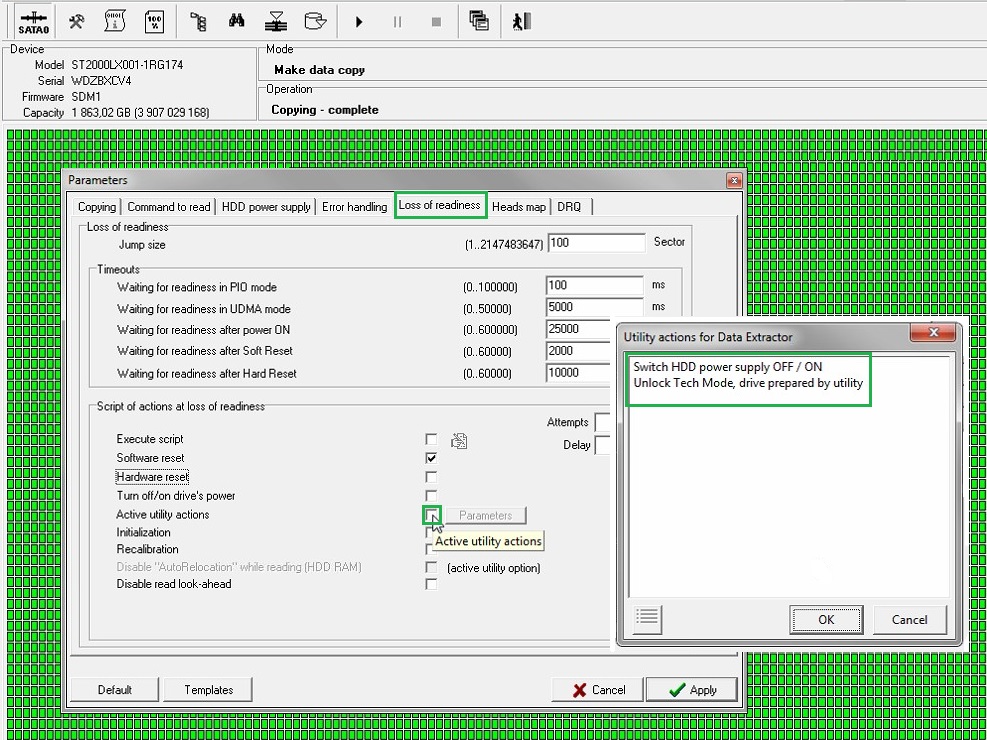
That’s it, now your drive is ready for imaging! Remember to add Autounlock in DE settings.

Hello Sir/Madam,
If your current SEO Company is still not able to get you on the first page of Google then we can help you.
SEO Packages for 15-20 keywords at only $80 per month
Monthly Task and Responsibilities
SEO (Search Engine Optimization) Activities:
ü Keywords Research
ü Initial Technical SEO Analysis
ü Competitor Analysis
ü Google Analytics Setup
ü Google Webmaster Setup
ü XML Sitemap Implementation
ü HTML Sitemap Implementation
ü Meta Tags Analysis and Optimization
ü Navigational Structure Optimization
ü New SEO Pages Creation (if required)
ü New SEO Pages Optimization
ü Heading Tag Analysis and Optimization
ü Image Optimization
ü Keywords mapping
ü Canonical Issue Check
ü Content Optimization
ü Internal linking Optimization
ü Optimization of HTML Source Code
ü Anchor Text Optimization
ü 20 Search Engine Submissions
ü 25 Manually Directory Submissions
ü 10 Article Submissions (2 Article Submit in 5 Top Directories)
ü 5 Press Release Distributions (1 Press Release submit in 5 Sites)
ü 5 Web2.0/Blog postings (Using pre-written articles)
ü 20 Social Bookmarking Submissions
ü 5 Classified ad submissions
ü 2 Unique Article writing (400+ words)
ü 1 Press Release writing (350+ words)
ü 1 Blog Creations
ü SMM (Social Media Marketing) Activities:
ü Video Creation
ü Video Submissions
ü Using YouTube for marketing
ü Image Submissions
ü Using the social network for marketing
ü Social Page creation on Facebook
ü Social Page Creation on Twitter
ü Review Posting on top Sites
ü Social Media Press Release Submission
ü Business Conversion Optimization Activities:
ü Homepage Design
ü Homepage Optimization
ü Ecommerce Optimization
ü Optimizing Headlines & Subject Lines
ü Using Testimonials Effectively
ü Viral Video Clips Drive Targeted Traffic
ü Use Video or images
ü Remove Negative feedback
ü Reporting Structure:
ü Ranking Report
ü Submissions Report
ü Google analytics Report
ü Traffic Report
ü Full Analysis Report
ü Weekly Report
ü Monthly Report
Note: We send a weekly report to you so that you can have regular updates on their website. Also, this shows that we work regularly on the website in a very elegant way.
Model : HGST HTS541010A7E630
Serial : S04001SSH8ML9F
Firmware : SE0OA4A0
Capacity : 0 MB ()
Loading the table of "open" modules................................... : Error
Error : .............................................................. : Error executing loading "open" modules dir command
Error executing command: Reading SA [0x3F0000004, 0x4]
Device error detected "ABR"
Error reading module USAG(0): Error executing command: Reading SA [0x3F0000004, 0x1]
Device error detected "ABR"
Error executing command: Reading SA [0x3F0100004, 0x4]
Device error detected "ABR"
Error reading module USAG(1): Error executing command: Reading SA [0x3F0100004, 0x1]
Device error detected "ABR"
Loading modules table................................................. : Error
Error : .............................................................. : Module USAG: no copies read!
Loading the table of "open" modules................................... : Error
Error : .............................................................. : Error executing loading "open" modules dir command
Drive identification reading ........... : Ok
Drive identification reading ........... : Ok
Drive identification reading ........... : Ok


spd: 0000 0000 0000
H: +00000
AP_PD BF80
ADC: FFEC
UF 1 AccTOErr
UF 3 GryDetectErr
H: +00001
5V: 04976
SpnOk
spd: 0000 0000 0000
AP_PD BF80
UF 7 1stGrayErr
UF 3 GryDetectErr
H: +00000
5V: 05006
SpnOk
spd: 0000 0000 0000
AP_PD BF80
UF 7 1stGrayErr
UF 3 GryDetectErr
H: +00001
5V: 05000
DBG>SRV>
SPW 1.5G LinkOk! ADC: 0004
SpnOk
spd: 0000 0000 0000
H: +00000
ADC: 0004
DAC: 898D
UF 3 1stGrayErr
H: +00001
UF 3 1stGrayErr
H: +00002
UF 3 1stGrayErr
H: +00003
UF 3 1stGrayErr
H: +00004
UF 3 1stGrayErr
H: +00005
UF 3 1stGrayErr
H: +00000
UF 3 1stGrayErr
H: +00001
UF 3 1stGrayErr
H: +00002
UF 3 1stGrayErr
H: +00003
UF 3 1stGrayErr
H: +00004
UF 3 1stGrayErr
H: +00005
UF 3 1stGrayErr
H: +00000
UF 3 1stGrayErr
H: +00001
UF 3 1stGrayErr
H: +00002
UF 3 1stGrayErr
H: +00003
UF 3 1stGrayErr
WriteSctLog -- buffer not valid
LED 13 0000
LED 13 0000
LED 13 0000
LED 13 0000
LED 13 0000
Model : ST500DM002-1BD142
Serial : Z2A939RT
Firmware : KC43
Capacity : 500 GB (976 773 168)
(DOS) Read Erro -
(DOS) Read Error -
(DOS) Read Erro -
(DOS) Read Error -
(DOS) Read Error -
Writing Saved Mode Pages...
Wr Sys File: vol = 3, FID = 093...
XYMODEM send: waiting for receiver...
Blocks count: b1K = 4, b128 = 4
Rd Sys File: vol = 3, FID = 093, Copy = 000...
Receiving file FILE_3_093_0, length = 4608
Verification............................ : Ok